I originally published this article on the Microsoft Tech Community.
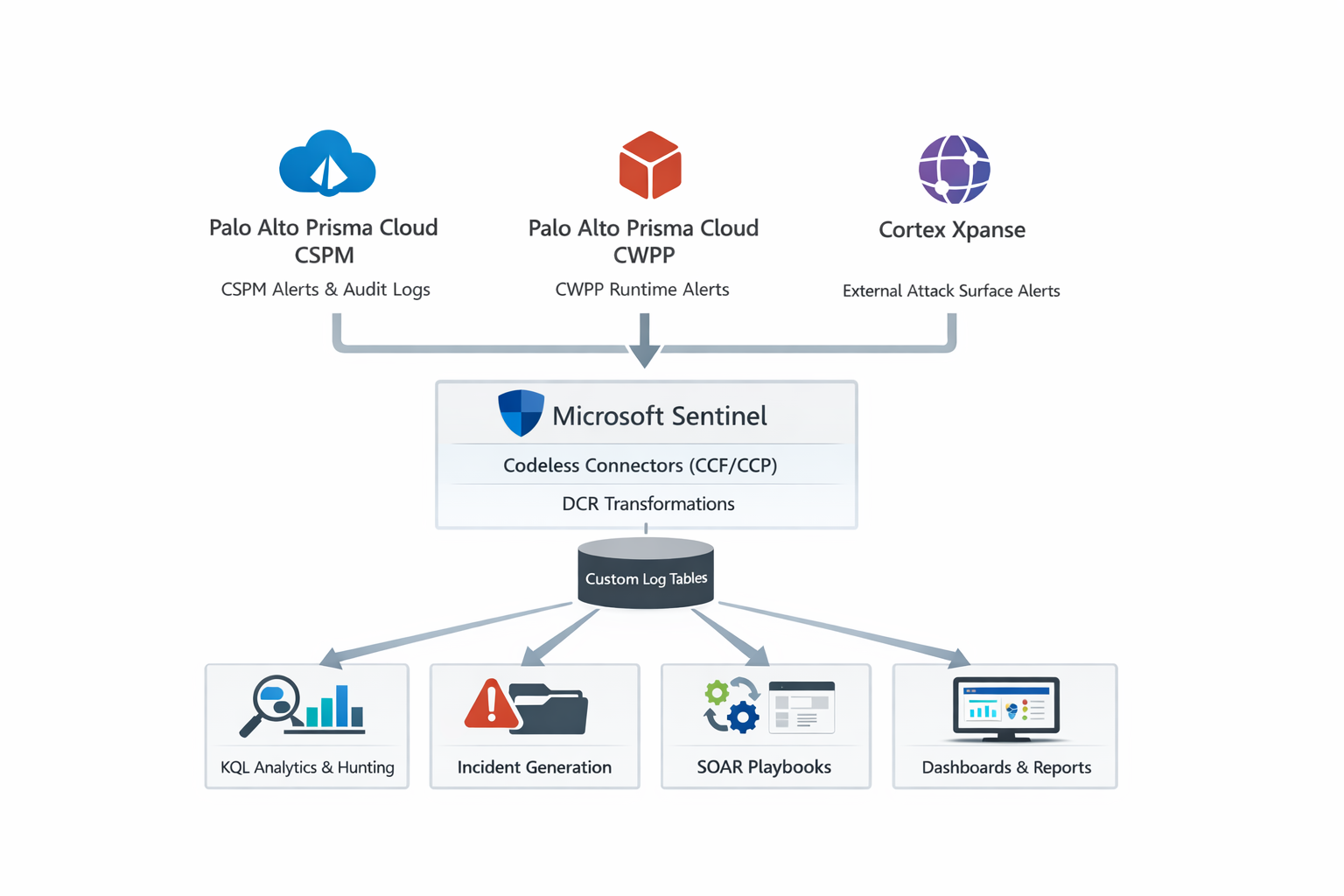
Microsoft expanded Microsoft Sentinel’s connector ecosystem with Palo Alto integrations that pull cloud posture, cloud workload runtime, and external attack surface signals into the SIEM — so your SOC can correlate “what’s exposed” and “what’s misconfigured” with “what’s actively being attacked.” Specifically, the Ignite connectors list includes Palo Alto: Cortex Xpanse CCF and Palo Alto: Prisma Cloud CWPP.
Why these connectors matter for Sentinel detection engineering
Traditional SIEM pipelines ingest “events.” But exposure and posture are just as important as the events — because they tell you which incidents actually matter.
- Attack surface (Xpanse) tells you what’s reachable from the internet and what attackers can see.
- Posture (Prisma CSPM) tells you which controls are broken (public storage, permissive IAM, weak network paths).
- Runtime (Prisma CWPP) tells you what’s actively happening inside workloads (containers/hosts/serverless).
In Sentinel, these become powerful when you can join them with your “classic” telemetry (cloud activity logs, NSG flow logs, DNS, endpoint, identity). The result: fewer false positives, faster triage, better prioritization.
Connector overview (what each one ingests)
1) Palo Alto Prisma Cloud CSPM solution
- What comes in: Prisma Cloud CSPM alerts + audit logs via the Prisma Cloud CSPM API.
- What it ships with: connector + parser + workbook + analytics rules + hunting queries + playbooks (prebuilt content).
- Best for: misconfiguration alerts (public storage, overly permissive IAM, weak encryption, risky network exposure) and compliance posture drift + audit readiness.
2) Palo Alto Prisma Cloud CWPP (Preview)
- What comes in: CWPP alerts via the Prisma Cloud API (Compute/runtime side).
- Implementation detail: built on the Codeless Connector Platform (CCP).
- Best for: runtime detections (host/container/serverless alerts) and “exploit succeeded” signals you need to correlate with posture and exposure.
3) Palo Alto Cortex Xpanse CCF
- What comes in: alerts logs fetched from the Cortex Xpanse API, ingested using the Microsoft Sentinel Codeless Connector Framework (CCF).
- Important: supports DCR-based ingestion-time transformations that parse to a custom table for better performance.
- Best for: external exposure findings and internet-facing risk detection — turning exposure into incidents only when the asset is critical or actively targeted.
Reference architecture (how the data lands in Sentinel)
Palo Alto Prisma Cloud CSPM ──(CSPM API: alerts + audit logs)──┐
Palo Alto Prisma Cloud CWPP ──(Prisma API: runtime alerts)─────┤
Cortex Xpanse ────────────────(Xpanse API: exposure alerts)────┘
                                      ▼
                            Sentinel Data Connector
                                      │  CCF / CCP + DCR transform
                                      ▼
                                 Custom Tables
                                      ▼
                        KQL Analytics + Hunting ──► Incidents ──► SOAR Playbooks
                                      └──────────► Workbooks / Dashboards
Key design point: Xpanse explicitly emphasizes DCR transformations at ingestion time — use that to normalize fields early so your queries stay fast under load.
Deployment patterns (practical, SOC-friendly setup)
Step 0 — Decide what goes to “analytics” vs “storage”
If you’re using Sentinel’s data lake strategy, posture/exposure data is a perfect candidate for longer retention (trend + audit), while only high-severity findings may need real-time analytics.
Step 1 — Install solutions from Content Hub
- Palo Alto Prisma Cloud CSPM Solution
- Palo Alto Prisma Cloud CWPP (Preview)
- Palo Alto Cortex Xpanse CCF
Step 2 — Credentials & least privilege
Create dedicated service accounts / API keys in the Palo Alto products with read-only scope for CSPM alerts + audit, CWPP alerts, and Xpanse alerts/exposures.
Step 3 — Validate ingestion (don’t skip this)
In Sentinel Logs:
- Locate the custom tables created by each solution (Tables blade).
- Run basic sanity queries: all events in the last 1h, top 20 alert types, distinct severities.
Tip: save these “ingestion smoke tests” as Hunting queries so you can re-run them after upgrades.
Step 4 — Turn on included analytics content (then tune)
The Prisma Cloud CSPM solution ships with multiple analytics rules, hunting queries, and playbooks — enable them gradually and tune thresholds before going wide.
Detection engineering: high-signal correlation recipes
These patterns consistently outperform single-source alerts. They’re KQL templates using placeholder table names, since your exact custom table names/columns are workspace-dependent (you’ll see them after install).
Recipe 1 — “Internet-exposed + actively probed” (Xpanse + network logs)
Goal: only fire when exposure is real and there’s traffic evidence.
let xpanse = <XpanseTable>
| where TimeGenerated > ago(24h)
| where Severity in ("High","Critical")
| project AssetIp=<ip_field>, Finding=<finding_field>, Severity, TimeGenerated;
let net = <NetworkFlowTable>
| where TimeGenerated > ago(24h)
| where Direction == "Inbound"
| summarize Hits=count(), SrcIps=make_set(SrcIp, 50) by DstIp;
xpanse
| join kind=inner (net) on $left.AssetIp == $right.DstIp
| where Hits > 50
| project TimeGenerated, Severity, Finding, AssetIp, Hits, SrcIps
Why it works: Xpanse gives you exposure; flow/WAF/firewall gives you intent.
Recipe 2 — “Misconfiguration that creates a breach path” (CSPM + identity/cloud activity)
Goal: prioritize posture findings that coincide with suspicious access or admin changes.
let posture = <PrismaCSPMTable>
| where TimeGenerated > ago(7d)
| where PolicySeverity in ("High","Critical")
| where FindingType has_any ("Public","OverPermissive","NoMFA","EncryptionDisabled")
| project ResourceId=<resource_id>, Finding=<finding>, PolicySeverity, FirstSeen=TimeGenerated;
let activity = <CloudActivityTable>
| where TimeGenerated > ago(7d)
| where OperationName has_any ("RoleAssignmentWrite","SetIamPolicy","AddMember","CreateAccessKey")
| project ResourceId=<resource_id>, Actor=<caller>, OperationName, TimeGenerated;
posture
| join kind=inner (activity) on ResourceId
| project PolicySeverity, Finding, OperationName, Actor, FirstSeen, TimeGenerated
| order by PolicySeverity desc, TimeGenerated desc
Recipe 3 — “Runtime alert on a workload that was already high-risk” (CWPP + CSPM)
Goal: raise severity when runtime alerts occur on assets with known posture debt.
let risky_assets = <PrismaCSPMTable>
| where TimeGenerated > ago(30d)
| where PolicySeverity in ("High","Critical")
| summarize RiskyFindings=count() by AssetId=<asset_id>;
<CWPPTable>
| where TimeGenerated > ago(24h)
| project AssetId=<asset_id>, AlertName=<alert>, Severity=<severity>, TimeGenerated, Details=<details>
| join kind=leftouter (risky_assets) on AssetId
| extend RiskScore = coalesce(RiskyFindings, 0)
| order by Severity desc, RiskScore desc, TimeGenerated desc
SOC outcome: the same runtime alert, prioritized differently depending on posture risk.
Operational notes (in real life)
- Normalize severities early. With Xpanse using DCR transforms, normalize severity to a consistent enum (Informational / Low / Medium / High / Critical) to simplify analytics.
- Deduplicate exposure findings. Attack-surface tools generate repeated findings. Use a dedup function (hash of asset + finding type + port/service) and alert only on new or changed exposure.
- Don’t incident-everything. Treat CSPM findings as incidents only when critical + reachable + targeted, or tied to privileged activity; as tickets when high-risk but not active; and as backlog when medium/low with compensating controls.
- Make SOAR “safe by default.” Prefer reversible actions — block IP (temporary), add to watchlist, notify owners, open a ticket with an evidence bundle — and only escalate to destructive actions after confidence thresholds.