I originally published this article on LinkedIn.
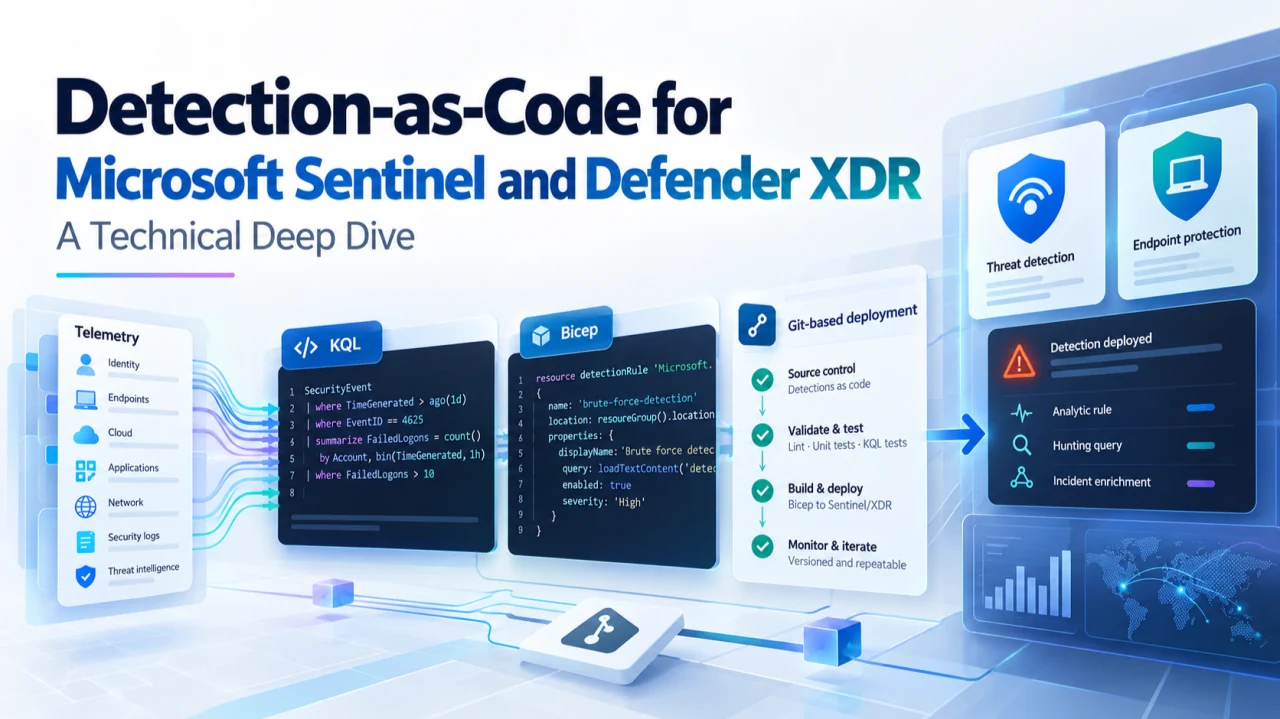
Microsoft introduced Preview support in July 2026 for managing Microsoft Defender XDR custom detection rules as code through Microsoft Sentinel Repositories. Custom detections can now be stored in GitHub or Azure DevOps, represented through the Microsoft Security Bicep extension, synchronized through Microsoft Sentinel Repositories, or deployed directly using Bicep.
This changes the technical model for detection engineering.
Saving KQL in Git is not new. Security teams have been versioning hunting queries for years. What is different is that the operational detection itself can now be represented as a deployable resource: its query, identity, execution schedule, alert metadata, severity, MITRE ATT&CK mapping, entity mapping, and enabled state can all be maintained as code.
The companion implementation used throughout this article is available here: KanenasCS/sentinel-defender-xdr-detection-as-code. The repository contains the KQL research, Bicep detection definition, validation logic, GitHub Actions workflows, and deployment guidance used in the examples below.
The Detection-as-Code model
Microsoft Defender XDR custom detections are technically different from traditional Microsoft Sentinel analytics rules.
Sentinel analytics rules historically use the Microsoft Sentinel resource model. Custom detections now expose a separate resource through the Microsoft Security Bicep extension. Microsoft currently documents repository integration and Bicep support for custom detections as Preview capabilities.
Microsoft is also increasingly positioning custom detections as the preferred way to create new rules that span Microsoft Sentinel and Defender XDR. Unlike traditional Sentinel analytics rules, custom detections can operate against Defender XDR data as well as Sentinel Analytics-tier data and can integrate with Defender response functionality.
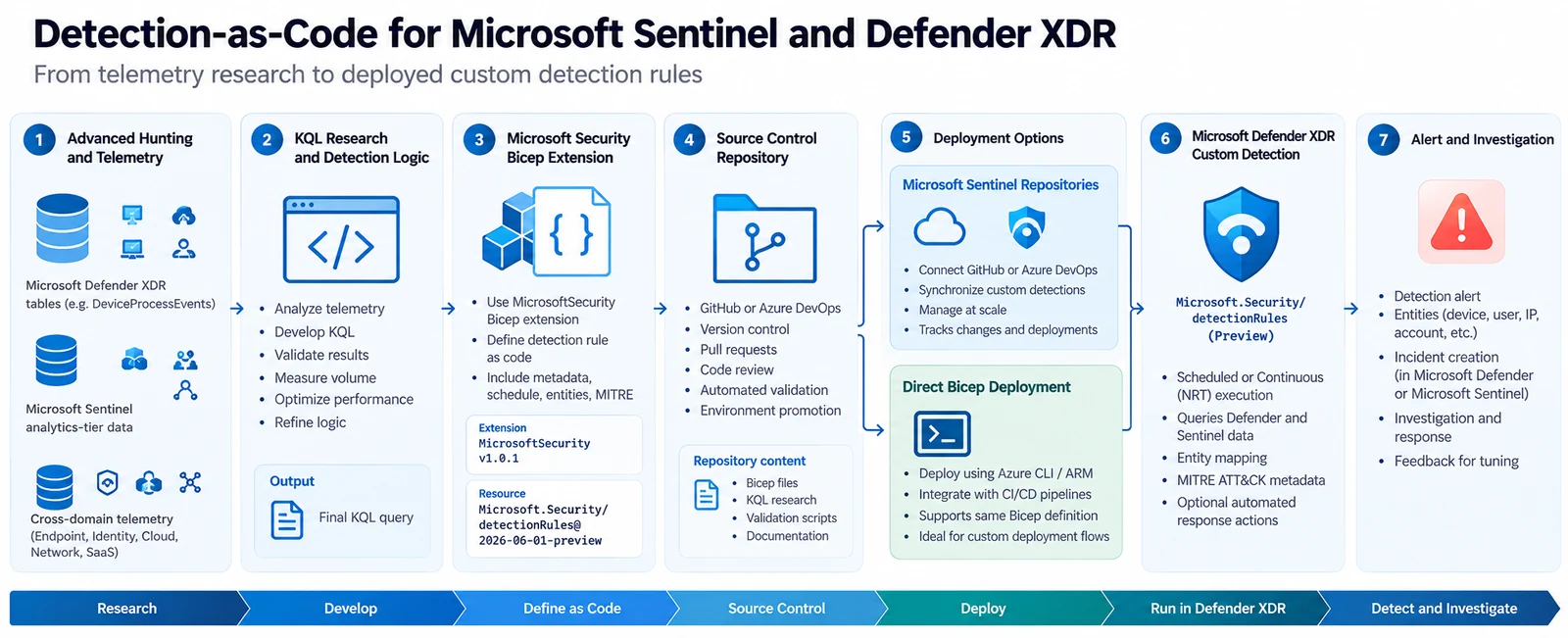
Figure 1 — Detection-as-Code architecture. The complete technical path from telemetry and Advanced Hunting through KQL research, Bicep, source control, deployment, Defender XDR custom detections, and alert generation.
The implementation is important because this is not simply an export format for an existing rule. Microsoft introduced a dedicated Bicep resource model for Defender custom detections.
Microsoft Security Bicep extension
The repository requires a bicepconfig.json file at its root. At the time of writing, Microsoft documents the following configuration:
{
  "extensions": {
    "MicrosoftSecurity": "br:mcr.microsoft.com/bicep/extensions/microsoftsecurity:v1.0.1"
  }
}
The detection file then activates that extension:
extension MicrosoftSecurityand declares the detection using:
resource detectionRule 'Microsoft.Security/detectionRules@2026-06-01-preview' = {
}
Microsoft currently documents v1.0.1 of the Microsoft Security Bicep extension together with Microsoft.Security/detectionRules@2026-06-01-preview. The same configuration is required for repository synchronization and direct Bicep deployment.
That resource type is one of the most interesting parts of the feature. A Sentinel detection engineer is no longer limited to storing something like:
DeviceProcessEvents
| where FileName =~ "powershell.exe"
| where ProcessCommandLine contains "-enc"
because that only preserves the query. A complete detection needs additional information about how the query operates inside the security platform. The Bicep resource provides that operational definition.
Research scenario: encoded PowerShell execution
For the technical example, I used DeviceProcessEvents to investigate PowerShell execution containing encoded-command or Base64-related indicators.
Encoded PowerShell alone is not sufficient evidence of malicious activity. Administrative scripts, software deployment systems, endpoint management platforms, and security products can all legitimately use encoded commands. The useful part of the example is therefore not the string -enc. The useful part is the research process required before converting a hunting hypothesis into an operational detection.
The first query establishes the PowerShell baseline:
DeviceProcessEvents
| where FileName in~ ("powershell.exe", "pwsh.exe")
| summarize
    Executions = count(),
    Devices = dcount(DeviceId),
    Users = dcount(AccountSid)
    by FileName
| order by Executions desc
This provides an initial view of how common PowerShell and PowerShell Core are across the environment. The next query narrows the dataset to execution that contains common encoded-command patterns:
DeviceProcessEvents
| where FileName in~ ("powershell.exe", "pwsh.exe")
| where ProcessCommandLine has "EncodedCommand"
    or ProcessCommandLine contains "-enc "
    or ProcessCommandLine contains "FromBase64String"
| summarize
    Executions = count(),
    Devices = dcount(DeviceId),
    Users = dcount(AccountSid)
At this point I still would not create a detection. The next useful question is which processes are responsible for launching the encoded PowerShell activity.
DeviceProcessEvents
| where FileName in~ ("powershell.exe", "pwsh.exe")
| where ProcessCommandLine has "EncodedCommand"
    or ProcessCommandLine contains "-enc "
    or ProcessCommandLine contains "FromBase64String"
| summarize
    Executions = count(),
    FirstSeen = min(Timestamp),
    LastSeen = max(Timestamp),
    Devices = dcount(DeviceId)
    by InitiatingProcessFileName,
       InitiatingProcessCommandLine
| order by Executions desc
This step is valuable because it identifies whether the activity is distributed across endpoints or dominated by a known deployment platform, monitoring agent, management product, or other legitimate parent process.
The research queries used for this process are included in the GitHub repository under research/encoded-powershell/ rather than being mixed directly with the deployable Bicep resource. That separation allows the repository to preserve both the final detection and the research that produced it.
Event identity matters
A KQL query can be syntactically valid and still be unsuitable for a Defender custom detection.
Microsoft recommends that Defender for Endpoint custom detection queries return Timestamp or TimeGenerated, together with DeviceId and ReportId. For Defender for Endpoint data, DeviceId and ReportId help ensure correct device scope and process-tree construction. The final event-level query therefore preserves those columns:
DeviceProcessEvents
| where FileName in~ ("powershell.exe", "pwsh.exe")
| where ProcessCommandLine has "EncodedCommand"
    or ProcessCommandLine contains "-enc "
    or ProcessCommandLine contains "FromBase64String"
| project
    Timestamp,
    DeviceId,
    ReportId,
    DeviceName,
    FileName,
    ProcessCommandLine,
    AccountName,
    AccountSid,
    InitiatingProcessFileName,
    InitiatingProcessCommandLine
This becomes particularly important when aggregation is introduced. Consider this query:
DeviceProcessEvents
| where FileName =~ "powershell.exe"
| summarize count() by DeviceName
The query works, but it removes the original event identity. If aggregation is necessary, the query can preserve the metadata from a representative event:
DeviceProcessEvents
| where FileName in~ ("powershell.exe", "pwsh.exe")
| summarize
    (Timestamp, ReportId) = arg_max(Timestamp, ReportId),
    ExecutionCount = count()
    by DeviceId, DeviceName
This difference is easy to miss when moving from Advanced Hunting experimentation to an operational detection. The purpose of the query is no longer only to return interesting rows. Its output must also contain enough information for Defender to associate the resulting alert with the appropriate entities and source activity.
Building the detection resource
Once the research query has been validated, it can be represented as a Defender custom detection resource. The implementation in the companion repository is located at:
detections/
└── defender-xdr/
    └── execution/
        └── suspicious-encoded-powershell.bicep
The Bicep definition is:
extension MicrosoftSecurity

resource detectionRule 'Microsoft.Security/detectionRules@2026-06-01-preview' = {
  id: 'xdr-suspicious-encoded-powershell'
  displayName: 'Suspicious Encoded PowerShell Execution'
  status: 'enabled'

  queryCondition: {
    queryText: '''
DeviceProcessEvents
| where FileName in~ ("powershell.exe", "pwsh.exe")
| where ProcessCommandLine has "EncodedCommand"
    or ProcessCommandLine contains "-enc "
    or ProcessCommandLine contains "FromBase64String"
| project
    Timestamp,
    DeviceId,
    ReportId,
    DeviceName,
    FileName,
    ProcessCommandLine,
    AccountName,
    AccountSid,
    InitiatingProcessFileName,
    InitiatingProcessCommandLine
'''
  }

  schedule: {
    frequency: 'PT1H'
  }

  detectionAction: {
    alertTemplate: {
      title: 'Suspicious Encoded PowerShell Execution'

      description: 'PowerShell execution containing encoded-command or Base64-related indicators was detected. Review the complete command line, process ancestry, account context, related network activity, and subsequent process execution.'

      severity: 'medium'

      tactics: [
        {
          tactic: 'Execution'
          techniques: [
            {
              technique: 'T1059.001'
            }
          ]
        }
      ]

      entityMappings: {
        hosts: [
          {
            id: 'device'
            deviceIdColumn: 'DeviceId'
          }
        ]
      }
    }
  }
}
The important point here is not the PowerShell logic itself. The resource captures considerably more than the KQL query: the same artifact contains the detection identity, execution state, schedule, alert template, severity, ATT&CK association, and entity mapping.
Microsoft also specifies that custom detection rules are uniquely identified by their id. For that reason, the ID should normally remain stable:
xdr-suspicious-encoded-powershellA new Git commit should represent a revision of the rule rather than generating a new ID for every deployment.
Repository design
The companion repository uses this structure:
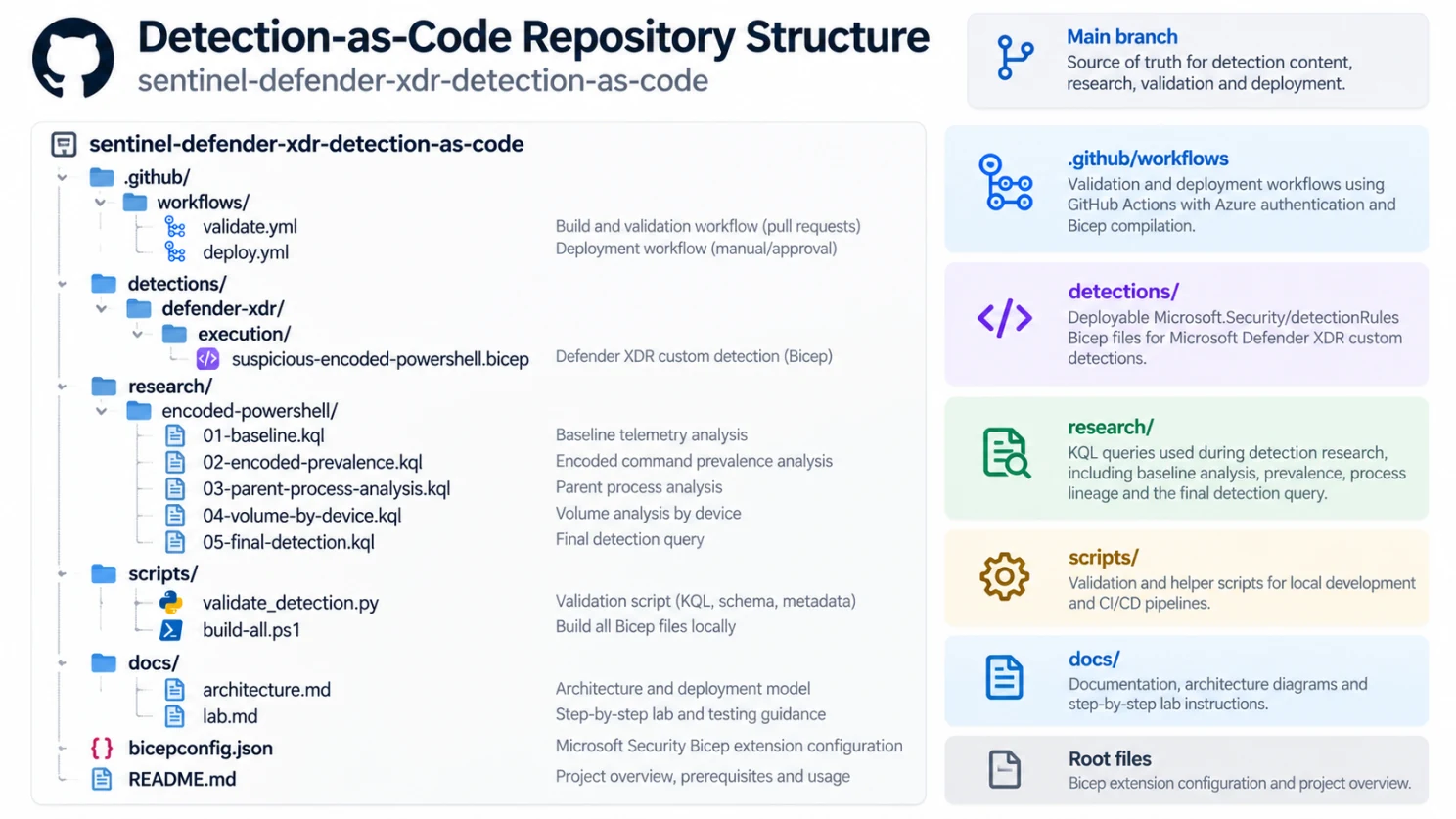
Figure 2 — Detection-as-Code repository structure.
sentinel-defender-xdr-detection-as-code/
├── .github/
│   └── workflows/
│       ├── validate.yml
│       └── deploy.yml
├── detections/
│   └── defender-xdr/
│       └── execution/
│           └── suspicious-encoded-powershell.bicep
├── research/
│   └── encoded-powershell/
│       ├── 01-baseline.kql
│       ├── 02-encoded-prevalence.kql
│       ├── 03-parent-process-analysis.kql
│       ├── 04-volume-by-device.kql
│       └── 05-final-detection.kql
├── scripts/
│   ├── validate_detection.py
│   └── build-all.ps1
├── docs/
│   ├── architecture.md
│   └── lab.md
├── bicepconfig.json
└── README.md
There is a deliberate distinction between research/ and detections/. The research directory contains the experiments used to understand the telemetry and derive the final detection. The detection directory contains only code intended to describe an operational rule. This makes later tuning easier to understand, because a change to a rule can be compared with the baseline and analysis that originally justified it.
Validating the Bicep definition
The minimum technical validation is compilation.
az bicep build \
  --file detections/defender-xdr/execution/suspicious-encoded-powershell.bicep
A successful Bicep build confirms that the file can be compiled against the configured extension. It does not confirm that the detection itself is correct. For that reason, the repository also includes scripts/validate_detection.py.
The validation script performs lightweight static checks against the Bicep detection, including the expected resource type, rule ID, query definition, scheduling block, alert template, and the presence of Timestamp, DeviceId, and ReportId. This is intentionally not a replacement for Microsoft-side validation or runtime testing.
A detection needs to be tested at multiple layers: its Bicep must compile, its KQL must execute, its event fields must support entity association, its expected match volume must be understood, and the deployed rule must successfully produce the intended alert.
Match volume before deployment
Microsoft currently limits an individual custom detection rule to 150 alerts for each execution. Microsoft recommends tuning the query to avoid alerting on routine activity before creating the detection. That makes match-volume research a technical requirement rather than an optional optimization. The repository includes a query for examining candidate matches per device:
DeviceProcessEvents
| where FileName in~ ("powershell.exe", "pwsh.exe")
| where ProcessCommandLine has "EncodedCommand"
    or ProcessCommandLine contains "-enc "
    or ProcessCommandLine contains "FromBase64String"
| summarize
    Matches = count(),
    Users = dcount(AccountSid),
    FirstSeen = min(Timestamp),
    LastSeen = max(Timestamp)
    by DeviceId, DeviceName
| order by Matches desc
A detection producing fifty matches from fifty unrelated endpoints represents a different security signal from fifty matches generated repeatedly by one known automation server. The total count alone does not tell you that. Distribution analysis does.
Query performance after deployment
Detection quality also includes query efficiency. Advanced Hunting has CPU-resource limits, and Microsoft provides a query resources report that identifies query execution time, CPU-resource usage, execution state, interface, and time range. The report can identify queries executed through custom detections as well as interactive hunting.
That provides a useful post-deployment research method. After enabling the rule, examine its actual resource usage rather than assuming the query is efficient because it returned quickly during development.
Microsoft’s Advanced Hunting guidance recommends reducing unnecessary result sets, filtering early, optimizing joins and summarizes, and monitoring CPU-resource consumption for frequently executed queries. This is particularly relevant for Detection-as-Code, because a query that is run manually once during an investigation has a very different operational profile from a query executed continuously or every hour.
Deployment through Microsoft Sentinel Repositories
Microsoft Sentinel Repositories support GitHub and Azure DevOps as source-control systems. For custom detections, the current implementation requires the Bicep detection file and the bicepconfig.json configuration to be present in the repository.
In the Microsoft Defender portal, repository configuration is available under Microsoft Sentinel → Content management → Repositories. The repository connection must include Custom Detection Rules as a supported content type.
Once configured, changes committed to the repository can be synchronized automatically into the security platform. Microsoft recommends that content managed through a connected repository be edited in the source repository rather than independently in Sentinel, because portal-side modifications can be overwritten by future repository deployments. That makes Git the effective desired state for the detection.
Direct Bicep deployment
Repository synchronization is not mandatory. Microsoft also documents direct deployment through the Azure CLI:
az deployment group create \
  --resource-group <RESOURCE_GROUP> \
  --template-file detectionRule.bicep \
  --name mtp-deployment
This allows the same Bicep resource to be incorporated into a custom CI/CD pipeline. The GitHub repository accompanying this article includes a GitHub Actions workflow for this scenario at .github/workflows/deploy.yml.
The deployment workflow is intentionally configured for manual execution rather than automatically deploying every merged detection. The repository separately contains .github/workflows/validate.yml for automated validation. This distinction is useful in technical research repositories: compilation and static analysis can be automatic, while deployment remains an explicit decision.
Detection engineering lifecycle
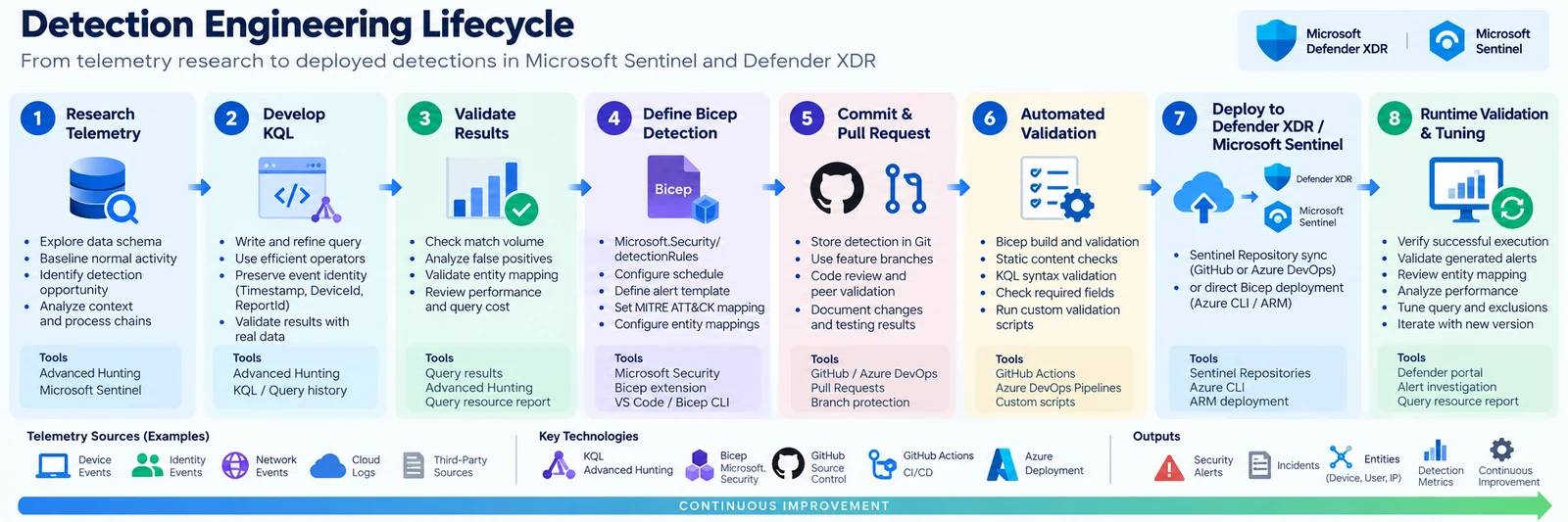
Figure 3 — Detection Engineering Lifecycle.
The third figure summarizes the practical workflow used in the repository. Telemetry is first examined in Advanced Hunting. The initial KQL is refined against real data, false positives, entity mapping, and query-resource behavior. Once the query is stable, the operational configuration is represented through Microsoft.Security/detectionRules. The Bicep artifact enters source control, automated validation runs against the change, and the detection is then deployed either through Sentinel Repositories or a direct Bicep pipeline.
The final stage is runtime validation. A green deployment is not proof of a working detection. The deployed rule should be checked in Microsoft Defender to confirm that it exists, is enabled, executes successfully, returns the intended matches, and creates the expected alert context. Microsoft also recommends verifying repository synchronization by making a controlled repository change after the initial deployment.
Repository state and detection state
Detection-as-Code introduces a useful distinction between the declared resource and the running resource. The repository describes what should exist. Defender XDR represents what is currently running. If the production rule is edited independently through the portal while Git remains unchanged, the two states diverge.
Microsoft’s repository documentation specifically recommends editing connected content in the repository to prevent subsequent repository deployments from overwriting independent portal changes.
Deletion also has non-obvious behavior. Deleting repository content does not automatically remove the deployed content from the Sentinel workspace. Microsoft states that content deployed through repositories should be removed from both the repository and Sentinel when it is intentionally retired. This means rule retirement should be treated as an explicit detection lifecycle operation rather than simply deleting a file from Git.
Current Preview limitations
This capability is still evolving. Microsoft currently documents two explicit limitations for the custom-detection Detection-as-Code Preview: custom frequency for Microsoft Sentinel data is not supported through this deployment path, and custom details are not supported.
This creates an important distinction between the Defender custom-detection product and its current Infrastructure-as-Code representation. A feature visible in the detection wizard is not automatically guaranteed to exist in the Preview Bicep schema. That distinction matters when converting existing portal-created rules into source-controlled definitions. The resource model should be validated against the current Microsoft documentation before new properties or deployment assumptions are introduced.
Sentinel data and custom detections
Microsoft’s broader direction is also visible in the relationship between Sentinel and Defender XDR. Custom detections can work with Defender data and Sentinel Analytics-tier data, while Microsoft continues to support traditional Sentinel analytics rules. Microsoft currently describes custom detections as the preferred path for new detections spanning the unified Sentinel and Defender XDR experience.
That has implications beyond rule management. Data architecture becomes part of detection architecture. A table’s availability to Advanced Hunting and the detection engine, its data tier, the fields it exposes, and its ingestion behavior all affect what can be detected. Detection-as-Code therefore does not eliminate the need to understand telemetry. It makes that requirement more visible.
Reproducibility
The strongest benefit of this model is reproducibility. The GitHub repository contains the research queries that establish the telemetry baseline, the final KQL used in the detection, the Bicep resource that describes the operational configuration, the validation scripts, and the deployment workflow.
The complete implementation is available here: KanenasCS/sentinel-defender-xdr-detection-as-code.
A researcher can inspect why a particular query was selected, compare revisions, compile the Bicep locally, review the automated validation, and reproduce the deployment process without reconstructing the detection manually from screenshots or portal settings. That is a materially different model from simply documenting a KQL query in a blog post.
Conclusion
Detection-as-Code for Microsoft Sentinel and Defender XDR is not interesting because KQL can now live in Git. KQL could already live in Git. The technical change is that Microsoft Defender custom detections are becoming deployable resources.
Using the Microsoft Security Bicep extension and Microsoft.Security/detectionRules, a detection can be represented together with its operational configuration and managed through the same source-controlled engineering process as other code artifacts. For detection research, this provides a cleaner separation between experimentation and production.
Advanced Hunting remains the environment in which telemetry is explored and detection logic is developed. Git preserves the research history and the final resource definition. Bicep provides the deployable representation. Sentinel Repositories or a custom pipeline provide the deployment mechanism. Defender XDR remains the runtime that evaluates the rule and produces the resulting alert.
The current implementation is still Preview, and the Bicep surface does not yet expose every capability available through the portal. But the architecture is already useful. A detection can now be researched, represented, versioned, validated, deployed, measured, and reproduced as a technical artifact rather than existing only as configuration inside a security portal.
For security researchers and detection engineers, that is the real value of Detection-as-Code.