I originally published this article on the Microsoft Tech Community.
Identity is now one of the most important attack surfaces in cloud security. In many real-world incidents, attackers don’t rely only on malware or network movement — they abuse identities, permissions, role assignments, group memberships, service principals, and misconfigured access paths to move from an initial compromise to high-value resources.
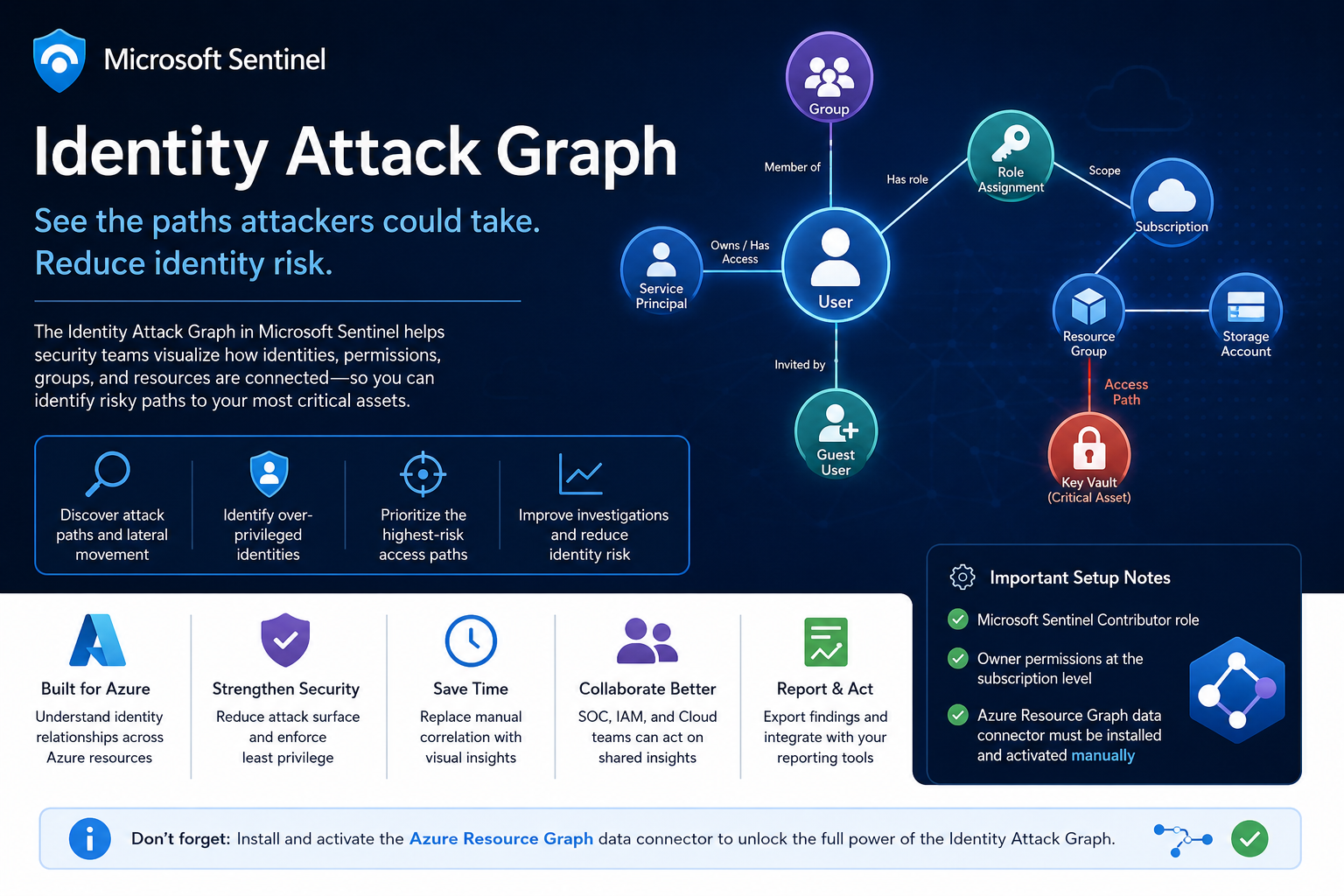
That’s why the new Identity Attack Graph in Microsoft Sentinel matters. It helps security teams visualize how identities are connected to Azure resources, and how an attacker could move from one identity to another resource through permissions and relationships.
What is the Identity Attack Graph?
The Identity Attack Graph provides a visual way to understand how identities, permissions, groups, and Azure resources are connected. Instead of manually checking multiple portals, logs, and role assignments, the graph surfaces relationships such as:
- Which identities have access to specific Azure resources
- Which users or service principals are over-privileged
- Which groups provide indirect access to sensitive resources
- Which identities may have a path to critical assets
- The potential blast radius of a compromised identity
- How attackers could move laterally through identity and permission relationships
This is especially useful because identity risk is often not obvious when looking at a single user, group, or role assignment in isolation. A user may not directly have access to a sensitive resource, but may be a member of a group that has access to another resource, which then has permissions that create a path toward a high-value asset. The graph exposes these hidden relationships.
Why this matters
In many Azure environments, permissions grow over time. Users change roles, groups are reused, emergency access is granted, service principals are created, and temporary permissions aren’t always removed. Organizations end up with too many privileged identities, stale permissions, over-privileged service principals, guest users with unnecessary access, groups that provide indirect access, and subscription-level roles broader than required — with little visibility into who can reach critical assets.
Traditional investigation requires analysts to move between Microsoft Entra ID, Azure RBAC, Azure Activity logs, Sentinel queries, Defender XDR, and Azure Resource Graph. The Identity Attack Graph reduces this complexity by presenting identity relationships as a connected graph, making it easier to answer questions like “What can this identity access?”, “What happens if this user is compromised?”, “Which access path should we remediate first?”, and “Why does this identity have access to this asset?”
Key use cases
Attack path discovery. Identify how an attacker could move from a compromised identity to a sensitive Azure resource — useful in both proactive assessments and active incident response.
Blast-radius analysis. When an identity is compromised, understand the potential impact — which resources are reachable through a compromised user, group, service principal, or managed identity — to support containment, prioritization, and stakeholder communication.
Over-privileged identity detection. Surface identities with more permissions than they need: users with Owner/Contributor at subscription level, service principals with broad permissions, guest users with privileged access, and groups that grant access to sensitive resources.
Privileged access review. Support access reviews by showing the real impact of permissions, not just a list of role assignments — is this assignment still required, is access direct or inherited, is this path expected or suspicious?
Incident response and threat hunting. Support investigations involving suspicious sign-ins, compromised users, privilege escalation, suspicious role assignments, lateral movement, and service principal abuse. The graph doesn’t replace logs or hunting queries — it gives analysts a faster way to understand relationships and prioritize what to investigate next.
Prerequisites and setup notes
During my evaluation, a few setup requirements stood out.
Microsoft Sentinel permissions. The environment must already be onboarded to Sentinel, and the user configuring the feature needs appropriate permissions. The documented role is Microsoft Sentinel Contributor — though in my experience that alone isn’t always enough for the full onboarding and validation experience.
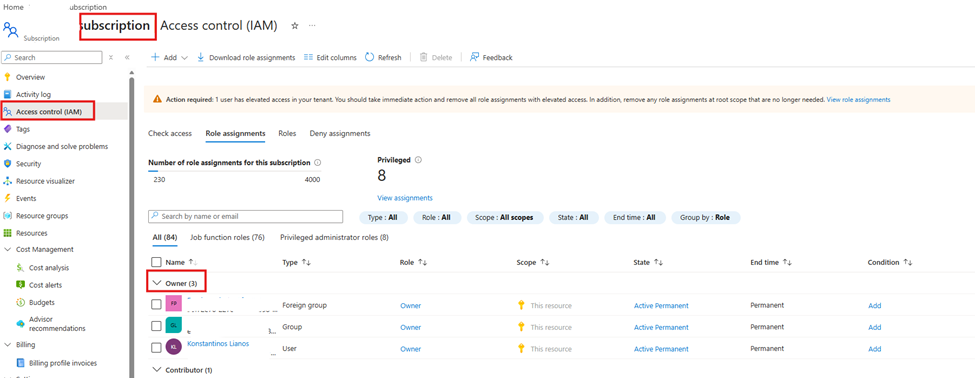
Subscription-level Owner permission. One prerequisite that should be called out clearly: Owner permissions at the Azure subscription level may be required. The graph depends on access to Azure resource and permission relationships, so without sufficient subscription-level permissions, some setup steps or visibility may not work as expected.
Required data connector: Azure Resource Graph. The Azure Resource Graph connector must be:
- Installed manually
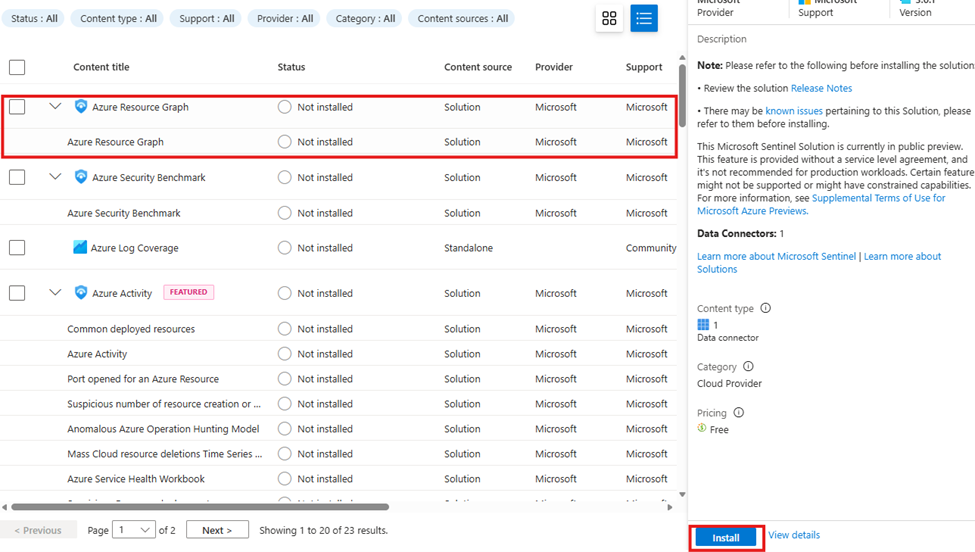
- Activated manually
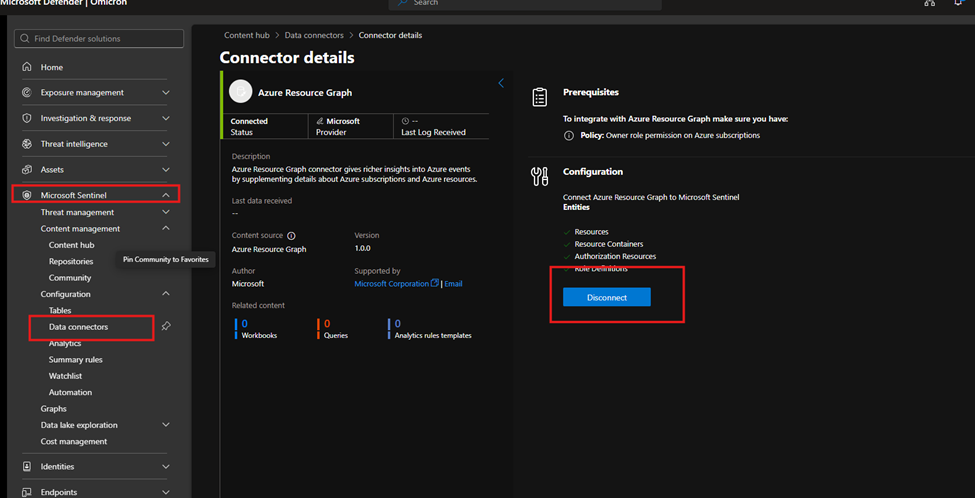
- Connected to the relevant Sentinel workspace
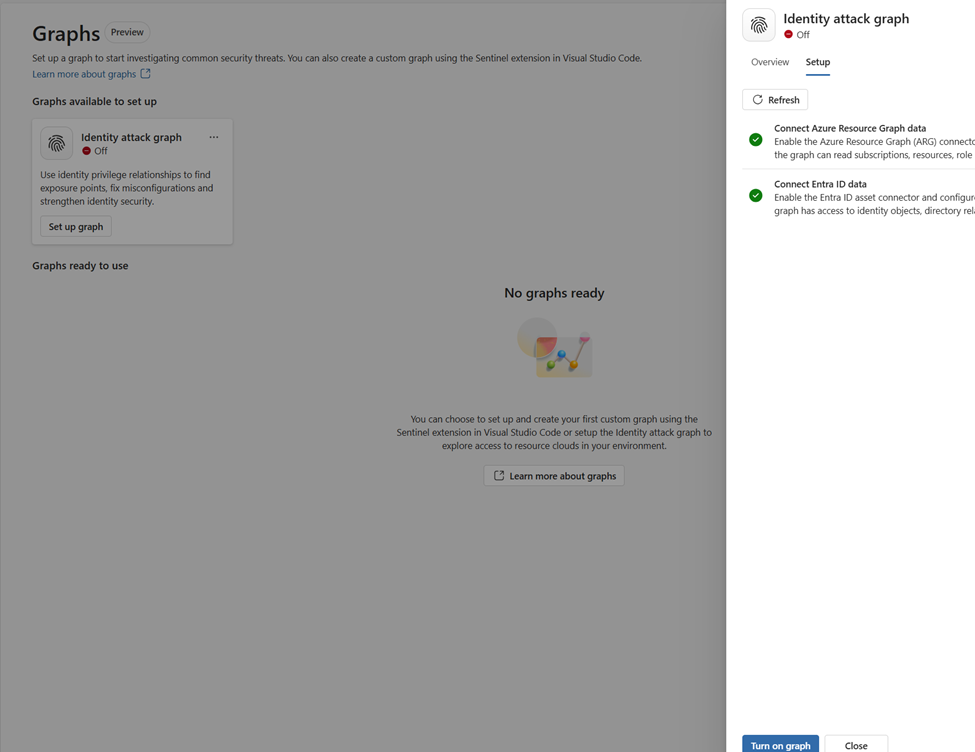
The connector is not automatically enabled just because the Identity Attack Graph feature is available. Without it, Sentinel may not have the Azure resource relationship data needed to build a useful graph.
Why Azure Resource Graph is important
Azure Resource Graph provides visibility across Azure resources, subscriptions, and relationships. For an identity attack graph, this is essential — the graph needs to understand not only identities, but also the resources those identities can reach.
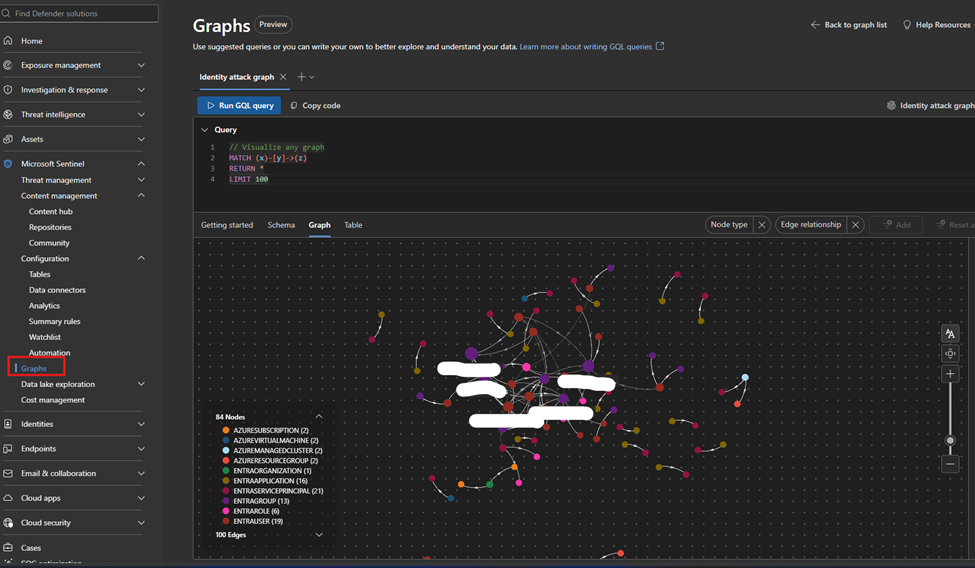
This may include subscriptions, resource groups, storage accounts, Key Vaults, virtual machines, managed identities, role assignments, resource relationships and hierarchy, and critical assets. Without this data, the attack graph may not provide the full picture of how identities connect to Azure resources. The onboarding instructions should explicitly state that the Azure Resource Graph data connector must be manually installed and activated before using the Identity Attack Graph.
Recommended onboarding checklist
| Requirement | Recommendation |
|---|---|
| Microsoft Sentinel workspace | Ensure the workspace is active and accessible |
| Sentinel role | Microsoft Sentinel Contributor or equivalent access |
| Subscription permissions | Owner permissions at subscription level |
| Azure Resource Graph connector | Manually install and activate the connector |
| Azure RBAC visibility | Ensure access to relevant role assignments |
| Microsoft Entra ID visibility | Ensure identity and group data is available |
| Resource visibility | Validate that relevant subscriptions and resources are visible |
| Data freshness | Allow enough time for data collection and graph population |
This helps avoid situations where the feature appears available but doesn’t show the expected relationships.
How the graph improves investigation
Before a graph-based approach, an analyst often manually collects and correlates data from many sources: checking the user in Entra ID, reviewing group memberships and Azure RBAC assignments, checking subscription- and resource-level permissions, reviewing PIM activations, searching Sentinel logs, running KQL, and validating with cloud or IAM teams. That’s time-consuming.
The graph shows relationships visually, so the analyst can understand the possible path faster. Instead of manually asking “Does this user have access to this resource through any group, role, or inherited permission?”, the graph shows the relationship directly — valuable because many risky permissions are indirect, inherited through a group, role assignment, nested relationship, or service principal path.
Where validation is still needed
The graph provides strong visibility, but findings should still be validated before remediation — removing access can affect business operations or production systems. Validate with Sentinel KQL, Entra sign-in and audit logs, Azure Activity logs, Azure RBAC role assignments, PIM activation history, Defender XDR signals, Defender for Cloud recommendations, Azure Resource Graph queries, and input from IAM/cloud/application owners. The graph is excellent for discovery and prioritization, but final remediation decisions should be validated.
GQL and graph-based investigation
Security teams already know KQL for log analytics, but graph investigation is different. KQL is excellent for searching and analyzing events over time (sign-ins, alerts, audit logs, activity). Graph Query Language (GQL) is designed for querying connected data — instead of only asking what happened at a specific time, graph queries answer how entities are connected. In identity security this is powerful, because the risk often exists in the relationship between objects.
Graph entities include users, groups, service principals, managed identities, roles, subscriptions, resource groups, Azure resources, permissions, sessions, and attack paths. Relationships include “user is member of group”, “group has role assignment”, “identity has access to resource”, “service principal owns application”, “managed identity can access Key Vault”, “user can escalate privilege”, and “identity can reach critical asset”. This lets analysts ask relationship-focused questions like “Which identities can reach this resource?” and “What is the shortest path from this user to a critical asset?”
KQL vs GQL: why both are useful
| Area | KQL | GQL / Graph querying |
|---|---|---|
| Main purpose | Analyze logs and events | Analyze relationships and paths |
| Best for | Time-based investigation | Connected identity/resource investigation |
| Question | “Did this user sign in from a risky location?” | “What resources can this user reach?” |
| Data model | Tables | Nodes and edges |
| Common use | Detection, hunting, analytics | Attack path discovery, relationship mapping |
| Strength | Event correlation | Path discovery |
In practice, teams need both:
- KQL identifies a suspicious sign-in.
- The Identity Attack Graph shows what the compromised identity could access.
- KQL then validates whether the attacker interacted with those resources.
This creates a strong workflow between event-based detection and relationship-based investigation.
Graph investigation scenarios
Conceptually, these are the kinds of graph questions useful in identity attack-path analysis:
- Paths from a user to critical resources — “Show me all paths from this user to critical Azure resources,” to determine whether a compromised identity has a direct or indirect route to sensitive assets.
- Identities with paths to Key Vaults — which users, groups, service principals, or managed identities have a path to Key Vault resources (which often hold secrets, certificates, and keys).
- Subscription-level privileged identities — which identities have Owner or Contributor access at subscription level, since these create wide attack paths.
- Indirect access through groups — which users have access to a resource through group membership, helping IAM teams clean up excessive group-based access.
- Service principals with broad access — which service principals have broad access to subscriptions or critical resources, since their compromise can lead to significant impact.
Strong GQL support in the graph explorer would let advanced users search for specific paths, filter by identity/role/resource type, find shortest or high-risk paths, exclude known-approved paths, and identify unexpected permission chains — moving both SOC analysts and cloud security engineers from visual exploration to repeatable analysis.