I originally published this article on the Microsoft Tech Community.
Microsoft Sentinel can ingest rich email security telemetry from Proofpoint and Mimecast to power advanced phishing detection. The Proofpoint On Demand (POD) Email Security and Proofpoint Targeted Attack Protection (TAP) connectors pull threat logs (quarantines, spam, phishing attempts) and user click data into Sentinel. Similarly, the Mimecast Secure Email Gateway connector ingests detailed mail flow and targeted-threat logs (attachment/URL scans, impersonation events). These integrations use Azure-hosted ingestion (via Logic Apps or Azure Functions) and the Codeless Connector framework to call vendor APIs on a schedule. The result is a consolidated dataset in Sentinel’s Log Analytics, enabling correlated alerting and hunting across email, identity, and endpoint signals.
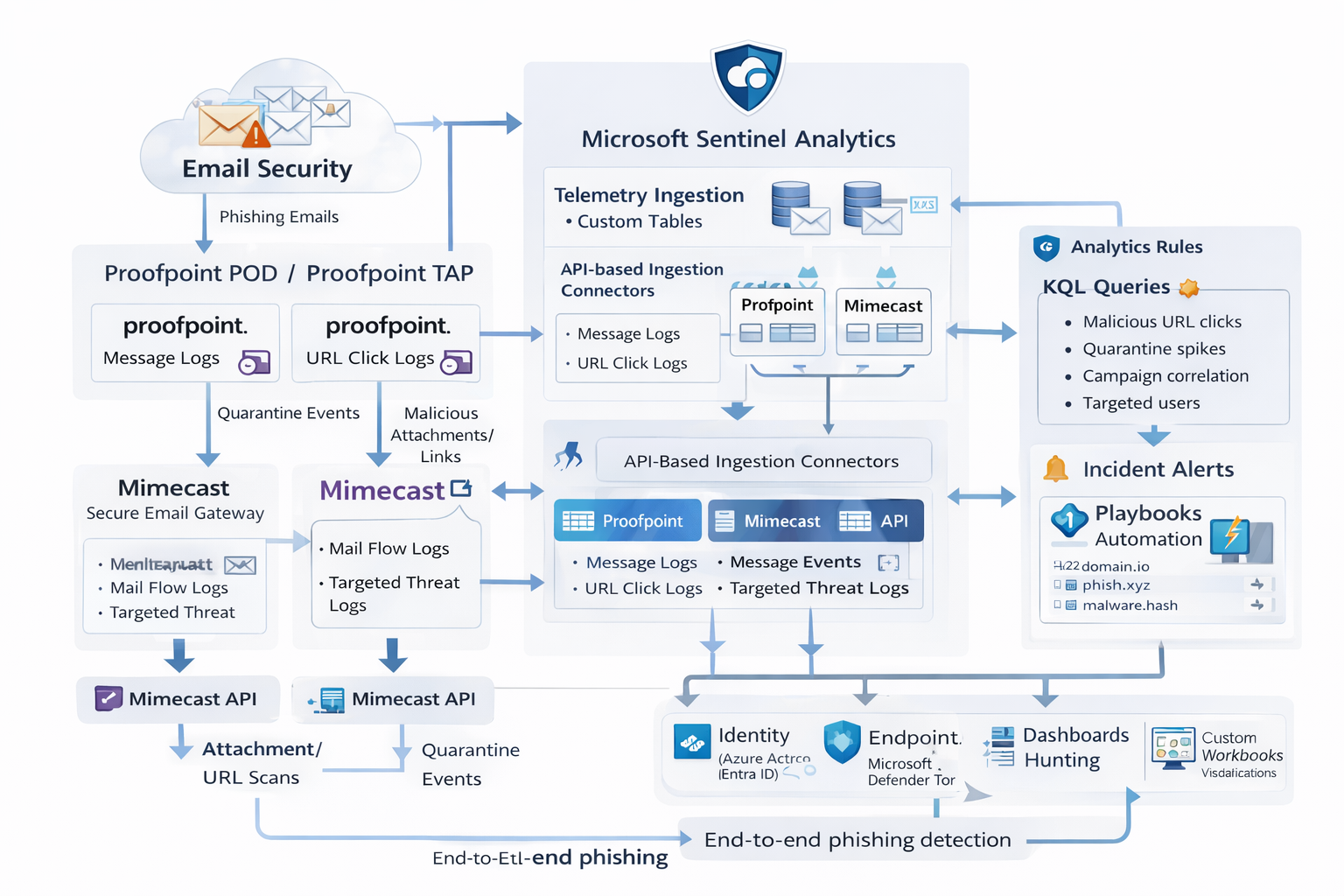
Phishing emails are processed by Mimecast’s gateway and Proofpoint POD/TAP services. Security logs (delivery/quarantine events, malicious attachments/links, user clicks) flow into Microsoft Sentinel, where these mail signals are correlated with identity (Azure AD), endpoint (Defender), and network telemetry for end-to-end phishing detection.
Proofpoint POD (Email Protection) connector
The Proofpoint POD connector ingests core email protection logs. It creates two tables, ProofpointPODMailLog_CL and ProofpointPODMessage_CL. These logs include per-message metadata (senders, recipients, subject, message size, timestamps), threat scores (spamScore, phishScore, malwareScore, impostorScore), and attachment details (number of attachments, names, hash values, sandbox verdicts). Quarantine actions are recorded (quarantine folder/rule), and malicious indicators (URL or file hash) and campaign IDs are tagged in the threatsInfoMap field. For example, each ProofpointPODMessage_CL record may carry a hashed sender, recipient list, subject, and any detected threat type (Phish/Malware/Spam/Impostor) with an associated threat hash or URL.
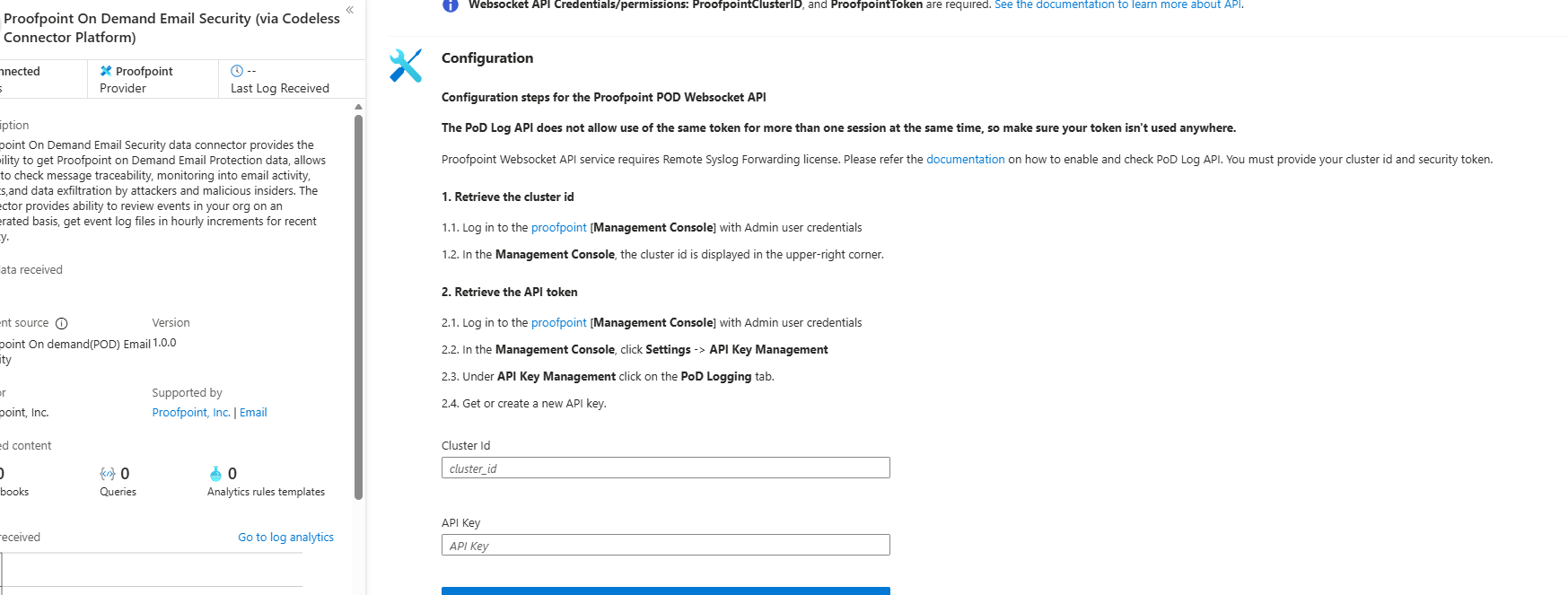
Deployment: Proofpoint POD uses Sentinel’s codeless connector (an Azure Function behind the scenes). You provide Proofpoint API credentials (Cluster ID and API token) in the connector UI. The connector periodically calls the Proofpoint SIEM API to fetch new log events (typically in 1–2 hour batches), landing data in the tables above. (Older custom Logic App approaches similarly parse JSON output from the /v2/siem/messages endpoints.)
Proofpoint TAP (Targeted Attack Protection) connector
Proofpoint TAP provides user-click and message-delivery events. Its connector creates four tables: ProofPointTAPMessagesDeliveredV2_CL, ProofPointTAPMessagesBlockedV2_CL, ProofPointTAPClicksPermittedV2_CL, and ProofPointTAPClicksBlockedV2_CL. The message tables report emails with detected threats (URL or attachment defense) that were delivered or blocked by TAP, including the same fields as POD (message GUID, sender, recipients, subject, threat campaign ID, scores, attachment info). The click tables log when users click URLs: each record has the URL, click timestamp (clickTime), the user’s IP (clickIP), user-agent, the message GUID, and the threat ID/category — so you can see who clicked which malicious link and when.
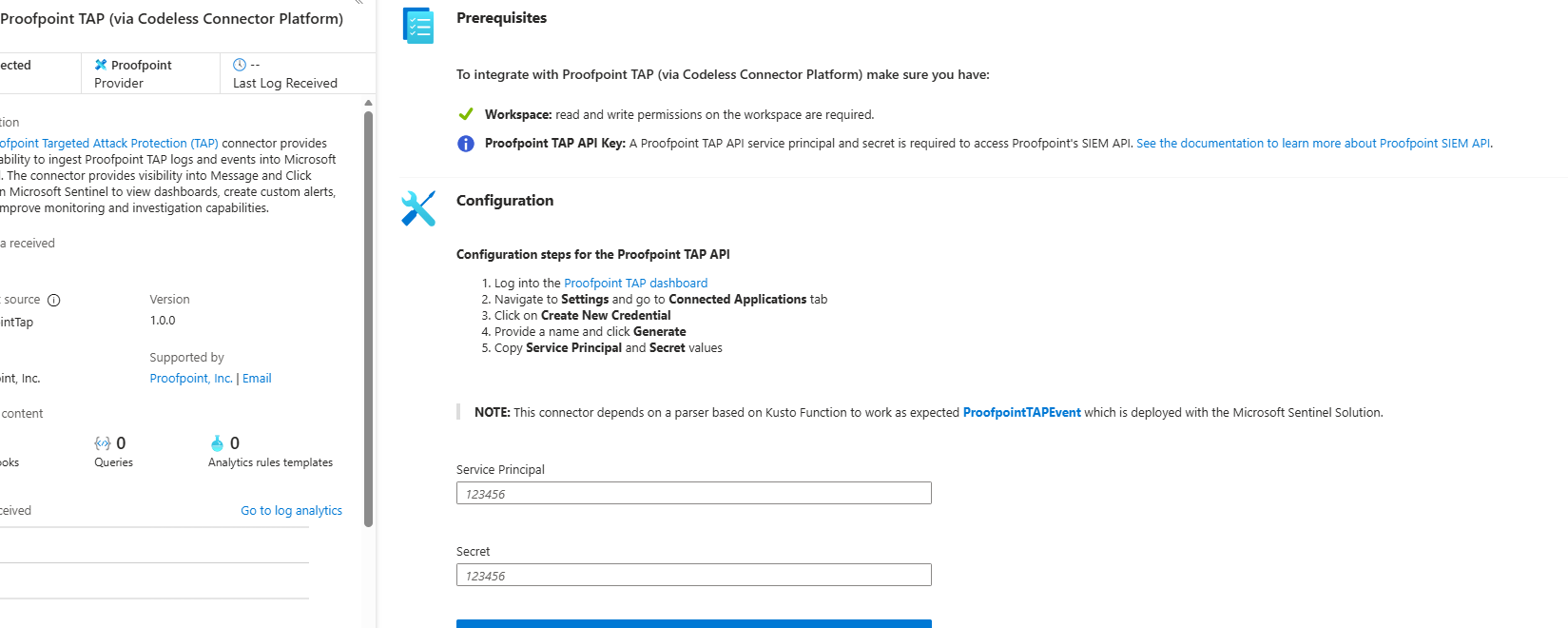
Deployment: The TAP connector also uses the codeless framework. You supply a TAP API service principal and secret in the Sentinel content connector. The function app calls TAP’s /v2/siem/clicks/blocked, /permitted, /messages/blocked, and /delivered endpoints. The Proofpoint SIEM API limits queries to 1-hour windows and 7-day history, with no paging (all events in the interval are returned).
Mimecast Secure Email Gateway connector
The Mimecast connector ingests Secure Email Gateway (SEG) logs and targeted-threat (TTP) logs. Inbound, outbound, and internal mail events from the Mimecast MTA (receipt, processing, delivery stages) are pulled via the API. Typical fields include the unique message ID (aCode), sender, recipient, subject, attachment count/names, and policy actions or holds (e.g. spam quarantine). Mimecast TTP logs are also collected: URL Protect logs (when a user clicks a blocked URL) include the clicked URL, category, sender/recipient, and block reason; Impersonation Protect logs capture spoofing detections with fields like Sender, Recipient, Definition, and Action; Attachment Protect logs record malicious file detections (filename, hash, threat type).
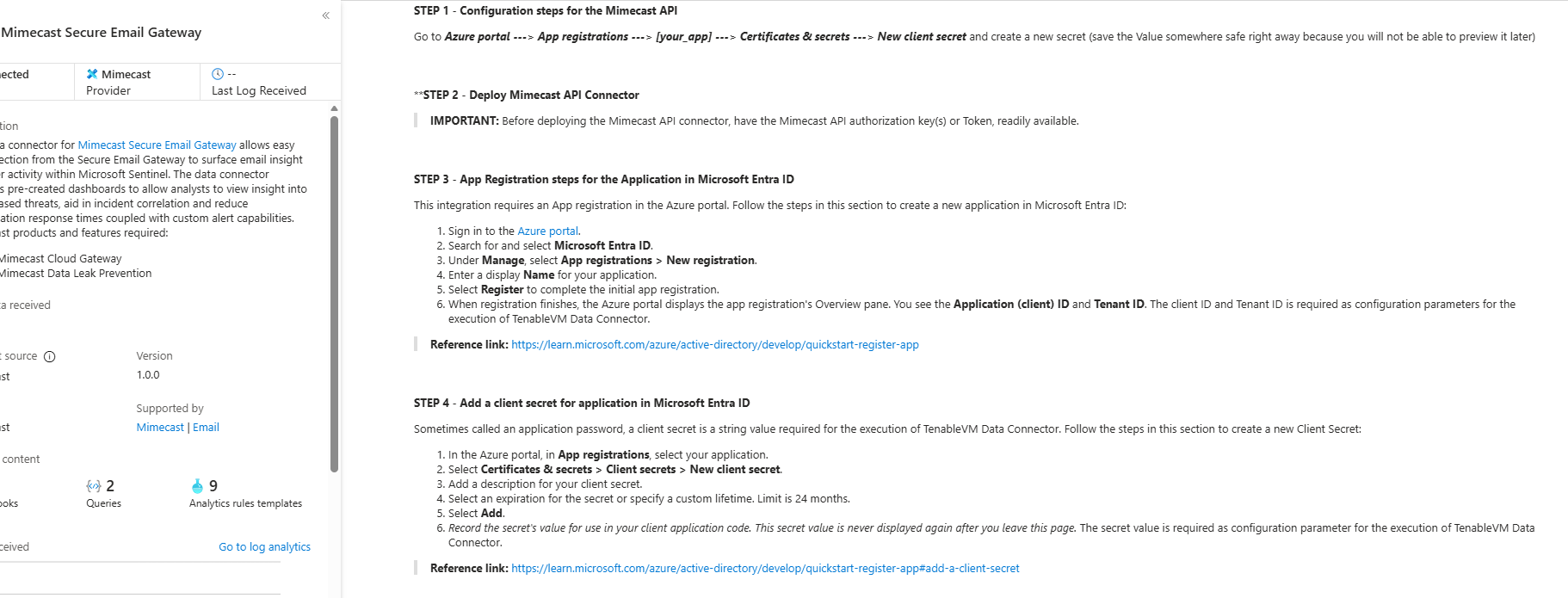
Deployment: Like Proofpoint, Mimecast’s connector uses Azure Functions via the Sentinel content hub. Install the Mimecast solution, open the connector page, then enter Azure app credentials and Mimecast API keys (Application ID/Key and Access/Secret for the service account). You provide the Azure Subscription, Resource Group, Log Analytics Workspace, and the Azure Client (App) ID, Tenant ID, and Object ID of the admin performing setup; on the Mimecast side, the regional API Base URL, App ID/Secret, and user Access/Secret. The connector creates a Function App that polls Mimecast’s SIEM APIs on a schedule (default every 30 minutes), with an optional start date to backfill up to 7 days. Default tables are MimecastSIEM_CL (email flow logs) and MimecastDLP_CL (DLP/TTP events).
Ingestion considerations
- Data latency: These connectors are pull-based and typically run on a schedule (often 30–60 minutes). Proofpoint POD uses hourly increments; Mimecast aggregates every 30 minutes. Expect up to an hour or more from event occurrence to ingestion.
- Schema nuances: APIs often return nested arrays and optional fields. Some Proofpoint JSON fields can be null or vary in type, so parse schemas should account for all possibilities. Mimecast logs come in pipe-delimited or JSON format, with occasionally empty values. In KQL, use
tostring()orparse_json()on the raw_CLcolumns, andmv-expandon multivalue fields. - Table names: POD →
ProofpointPODMailLog_CL,ProofpointPODMessage_CL; TAP → the fourProofPointTAP…V2_CLtables; Mimecast →MimecastSIEM_CL(SEG) andMimecastDLP_CL(TTP). - API behavior: The Proofpoint TAP API has no paging. Watch timezones (Proofpoint uses UTC) and bin on
TimeGeneratedor the event timestamp.
Detection engineering and correlation
To detect phishing effectively, correlate these email logs with identity, endpoint, and intel data:
- Identity (Azure AD): Join TAP clicks by recipient to the user’s UPN, and match the clicker’s IP (
clickIP) against Azure AD sign-in or VPN logs to find which device/location clicked a malicious link. Anomalous sign-ins (impossible travel, MFA failure) after a suspicious email strengthen the case. - Endpoints (Defender): After a bad click or malicious attachment (captured in TAP/Mimecast), watch for follow-on behavior in
DeviceProcessEvents/DeviceSecurityEvents. Correlate thethreatID/URL hash from email events with Defender file data, matching by username or IP around the same time window. - Threat intelligence: Join email logs against
ThreatIntelligenceIndicator(type = URL) to flag known-bad URLs. Proofpoint logs already classify threats and provide athreatID; Mimecast URL logs include aurlCategory. Automated playbooks can enrich further via TI feeds or watchlists of phishing domains.
A robust strategy: (1) identify malicious email events (high phish scores, quarantines, URL clicks); (2) correlate by user with Azure AD logs (new-IP login after a phish click?); (3) correlate with endpoint alerts (Defender found malware on that device); (4) augment with threat-intel lookups on URLs and attachments. Linking Proofpoint/Mimecast signals to identity and endpoint events reveals the full chain from email compromise to endpoint breach.
KQL queries
Representative Kusto queries for common phishing scenarios (adapt table/field names as needed).
Malicious URL click detection — users who clicked known-malicious URLs, by joining TAP click logs to TI indicators:
let TI = ThreatIntelligenceIndicator
| where Active == true and _EntityType == "URL";
ProofPointTAPClicksPermittedV2_CL
| where url_s != ""
| project ClickTime=TimeGenerated, Recipient=recipient_s, URL=url_s, SenderIP=senderIP_s
| join kind=inner TI on $left.URL == TI._Value
| project ClickTime, Recipient, URL, Description=TI.Description
Or aggregate clicks by domain:
ProofPointTAPClicksPermittedV2_CL
| extend clickedDomain = extract(@"https?://([^/]+)", 1, url_s)
| summarize ClickCount=count() by clickedDomain
| where clickedDomain has "maliciousdomain.com" or clickedDomain has "phish.example.com"
Quarantine spike (burst) detection — hours with an unusually high number of held/quarantined emails, which may indicate a campaign:
ProofpointPODMailLog_CL
| where action_s == "Held"
| summarize HeldCount=count() by bin(TimeGenerated, 1h)
| order by TimeGenerated desc
| where HeldCount > 100
Targeted user phishing — recent phishing attempts against a specific user:
ProofpointPODMessage_CL
| where recipient has "<user@example.com>"
| where array_length(threatsInfoMap) > 0 and threatsInfoMap_classification_s == "Phish"
| project TimeGenerated, sender_s, subject_s, threat=threatsInfoMap_threat_s
Campaign-level analysis — group emails by Proofpoint campaign ID to see each campaign’s scope:
ProofpointPODMessage_CL
| mv-expand threatsInfoMap
| summarize Recipients=make_set(recipient), Count=dcount(recipient) by CampaignID=threatsInfoMap_campaignId_s
| project CampaignID, RecipientCount=Count, Recipients, SampleSubject=any(subject_s)
Each query can be refined (for instance, filtered to a recent window) and embedded in Sentinel analytics rules or hunting. The key is using the connectors’ fields — URLs, sender/recipient addresses, campaign IDs — to pivot between email data and other security signals.