I originally published this article on the Microsoft Tech Community.
I validated what it takes to make SAP and SAP-adjacent security signals operational in a SOC: reliable ingestion, stable schemas, and detections that survive latency and schema drift. I focus on four integrations into Microsoft Sentinel: SAP Enterprise Threat Detection (ETD) cloud edition (SAPETDAlerts_CL, SAPETDInvestigations_CL), SAP S/4HANA Cloud Public Edition agentless audit ingestion (ABAPAuditLog), Onapsis Defend (Onapsis_Defend_CL), and SecurityBridge (also ABAPAuditLog).
Because vendor API specifics for the ETD Retrieval API / Audit Retrieval API aren’t publicly detailed in the accessible primary sources I could retrieve, I explicitly label pagination/rate/time-window behaviors as unspecified where appropriate.
Connector architectures and deployment patterns
For SAP-centric telemetry I separate two planes:
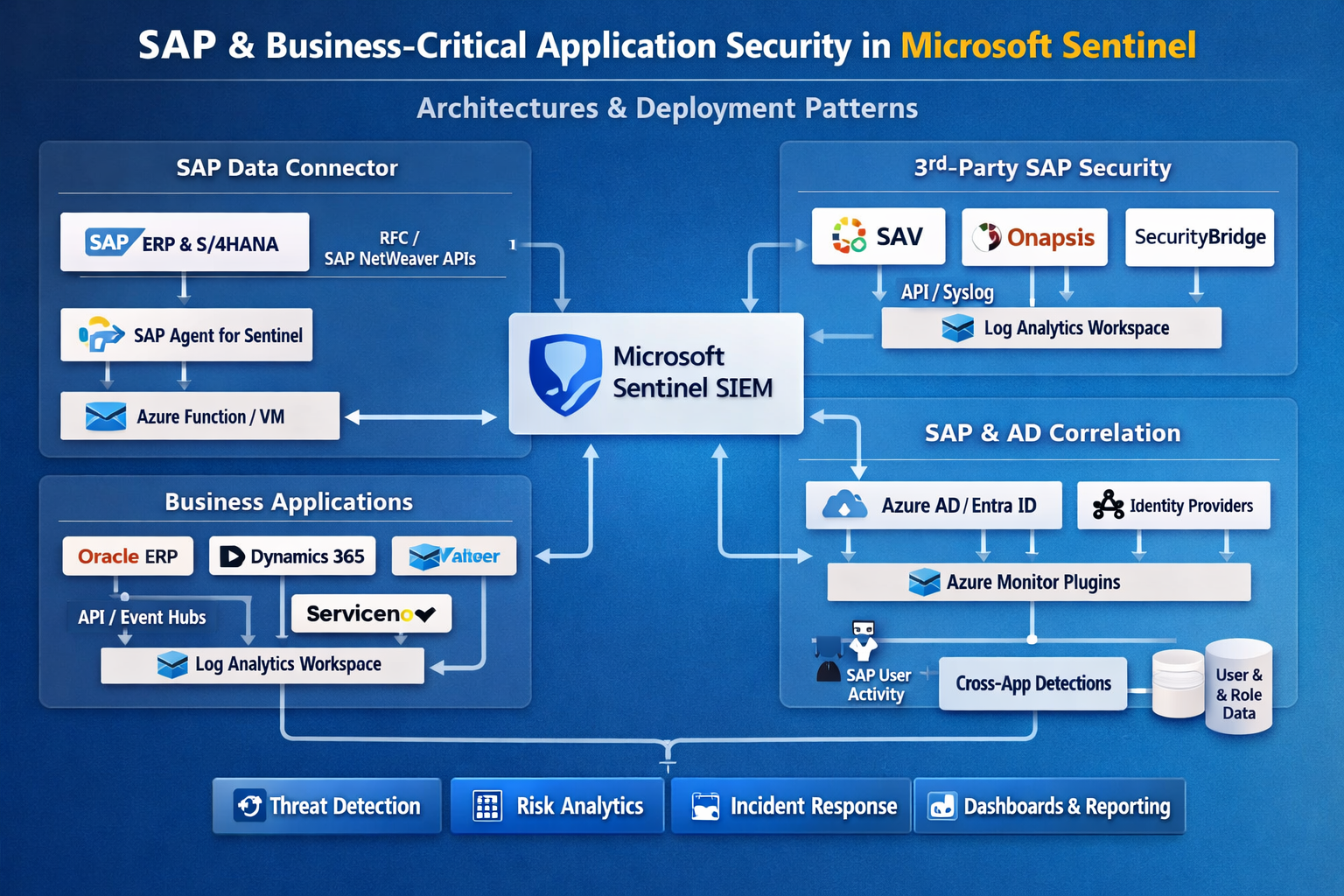
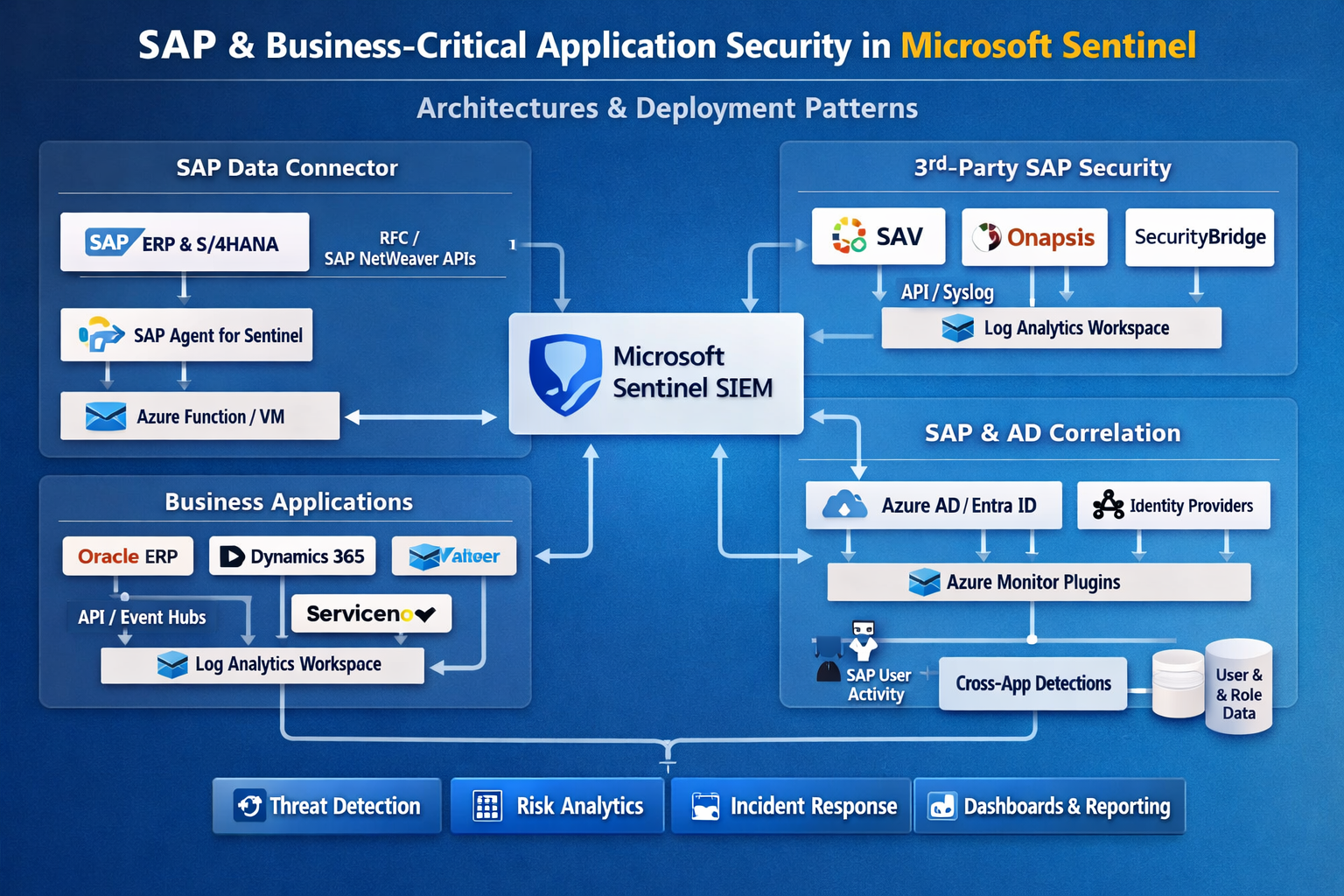
First is SAP application telemetry that lands in SAP-native tables — especially ABAPAuditLog, ABAPChangeDocsLog, ABAPUserDetails, and ABAPAuthorizationDetails. These tables are the foundation for ABAP-layer monitoring and are documented with typed columns in the Azure Monitor Logs reference.
Second is external “security product” telemetry (ETD alerts, Onapsis findings). These land in custom tables (*_CL) and typically require a SOC-owned normalization layer to avoid brittle detections.
Within Microsoft’s SAP solution there are two deployment models: agentless and containerized connector agent. The agentless connector uses SAP Cloud Connector and SAP Integration Suite to pull logs, and Microsoft documents it as the recommended approach; the containerized agent is being deprecated and disabled on September 14, 2026.
On the implementation-technology axis, Sentinel integrations generally show up as Codeless Connector Framework (CCF) pollers/pushers (SaaS-managed ingestion definitions with DCR support), or Function/Logic App custom pipelines using the Logs Ingestion API when you need custom polling, enrichment, or a vendor endpoint not modeled in CCF.
In my view, ETD and S/4HANA Cloud connectors are “agentless” from the Sentinel side (API credentials only), while Onapsis Defend and SecurityBridge behave like push pipelines because Microsoft requires an Entra app + DCR permissions (the typical Logs Ingestion API pattern).
Authentication and secrets handling
Microsoft documents the required credentials per connector:
- ETD cloud connector — Client ID + Client Secret for the ETD Retrieval API (token mechanics unspecified).
- S/4HANA Cloud Public Edition — Client ID + Client Secret for the Audit Retrieval API (token mechanics unspecified); Microsoft notes alternative authentication mechanisms exist.
- Onapsis Defend and SecurityBridge — a Microsoft Entra ID app registration and Azure permission to assign Monitoring Metrics Publisher on DCRs, mapping directly to the Logs Ingestion API guidance.
For production I treat these as SOC platform secrets: store client secrets/certificates in Key Vault when you own the pipeline (Function/Logic App); rotate on an operational schedule; alert on auth failures and sudden ingestion drops. For vendor-managed ingestion, I still require documented ownership of the Entra app, explicit RBAC scope for the DCR, and change control for credential rotation — because a rotated secret is effectively a data outage.
API behaviors and ingestion reliability
For the ETD Retrieval API and Audit Retrieval API, pagination/rate limits/time windows are unspecified in the accessible vendor documentation. I therefore design ingestion and detections assuming non-ideal API behavior: late-arriving events, cursor/page limitations, and throttling.
CCF’s RestApiPoller model supports explicit retry policy, windowing, and multiple paging strategies, so if/when you obtain vendor API semantics, you can encode them declaratively rather than writing fragile code.
For the SAP solution’s telemetry plane, Microsoft provides strong operational cues: agentless collection flows through Integration Suite, and troubleshooting typically happens in the Integration Suite message log — validate delivery failures there before debugging Sentinel-side parsers. For scheduled detections, always account for ingestion delay: widen event lookback by the expected delay and then constrain on ingestion_time() to prevent duplicates from overlap.
Schema, DCR transformations, and normalization layer
Connector attribute comparison
| Connector | Auth method | Sentinel tables | Default polling | Backfill | Pagination | Rate limits |
|---|---|---|---|---|---|---|
| SAP ETD (cloud) | Client ID + Secret (ETD Retrieval API) | SAPETDAlerts_CL, SAPETDInvestigations_CL |
unspecified | unspecified | unspecified | unspecified |
| SAP S/4HANA Cloud (agentless) | Client ID + Secret (Audit Retrieval API); alt auth referenced | ABAPAuditLog |
unspecified | unspecified | unspecified | unspecified |
| Onapsis Defend | Entra app + DCR permission (Monitoring Metrics Publisher) | Onapsis_Defend_CL |
n/a (push) | unspecified | n/a | unspecified |
| SecurityBridge | Entra app + DCR permission (Monitoring Metrics Publisher) | ABAPAuditLog |
n/a (push) | unspecified | n/a | unspecified |
Ingestion-time DCR transformations
Sentinel supports ingestion-time transformations through DCRs to filter, enrich, and mask data before storage. Example — remove low-signal audit noise and mask email identifiers in ABAPAuditLog:
source
| where isnotempty(TransactionCode) and isnotempty(User)
| where TransactionCode !in ("SM21","ST22")   // example noise; tune per tenant
| extend Email = iif(Email has "@", strcat(substring(Email,0,2),"***@", tostring(split(Email,"@")[1])), Email)
Normalization functions
Microsoft recommends using SAP solution functions instead of raw tables, because the infrastructure beneath can change without breaking detections. I follow the same pattern for ETD/Onapsis custom tables — publishing SOC-owned functions as a schema contract:
.create-or-alter function with (folder="SOC/SAP") Normalize_ABAPAudit() {
    ABAPAuditLog
    | project TimeGenerated, SystemId, ClientId, User, TransactionCode, TerminalIpV6,
              MessageId, MessageClass, MessageText, AlertSeverityText, UpdatedOn
}

.create-or-alter function with (folder="SOC/SAP") Normalize_ETDAlerts() {
    SAPETDAlerts_CL
    | extend
        AlertId  = tostring(coalesce(column_ifexists("AlertId",""), column_ifexists("id",""))),
        Severity = tostring(coalesce(column_ifexists("Severity",""), column_ifexists("severity",""))),
        SapUser  = tostring(coalesce(column_ifexists("SAP_User",""), column_ifexists("User",""), column_ifexists("user","")))
    | project TimeGenerated, AlertId, Severity, SapUser, *
}

.create-or-alter function with (folder="SOC/SAP") Normalize_Onapsis() {
    Onapsis_Defend_CL
    | extend
        FindingId = tostring(coalesce(column_ifexists("FindingId",""), column_ifexists("id",""))),
        Severity  = tostring(coalesce(column_ifexists("Severity",""), column_ifexists("severity",""))),
        SapUser   = tostring(coalesce(column_ifexists("SAP_User",""), column_ifexists("user","")))
    | project TimeGenerated, FindingId, Severity, SapUser, *
}
Health/lag monitoring and anti-gap
I monitor both connector health and ingestion delay. SentinelHealth is the native health table, and Microsoft provides a health workbook and schema reference.
let lookback=24h;
union isfuzzy=true
    (ABAPAuditLog      | extend T="ABAPAuditLog"),
    (SAPETDAlerts_CL   | extend T="SAPETDAlerts_CL"),
    (Onapsis_Defend_CL | extend T="Onapsis_Defend_CL")
| where TimeGenerated > ago(lookback)
| summarize LastEvent=max(TimeGenerated),
            P95DelaySec=percentile(datetime_diff("second", ingestion_time(), TimeGenerated), 95),
            Events=count()
          by T
Anti-gap scheduled-rule frame (Microsoft pattern):
let ingestion_delay=10m;
let rule_lookback=5m;
ABAPAuditLog
| where TimeGenerated >= ago(ingestion_delay + rule_lookback)
| where ingestion_time() > ago(rule_lookback)
SOC detections: ABAP privilege abuse, insider behavior, audit readiness
Privileged ABAP transaction monitoring
ABAPAuditLog includes TransactionCode, User, SystemId, and terminal/IP fields, so I start with a curated high-risk tcode set and then add baselines:
let PrivTCodes=dynamic(["SU01","PFCG","SM59","RZ10","SM49","SE37","SE16","SE16N"]);
Normalize_ABAPAudit()
| where TransactionCode in (PrivTCodes)
| summarize Actions=count(), Ips=make_set(TerminalIpV6,5) by SystemId, User, TransactionCode, bin(TimeGenerated, 1h)
| where Actions >= 3
Insider scenario: sensitive object change near privileged audit activity
ABAPChangeDocsLog exposes ObjectClass, ObjectId, and change types; I correlate sensitive object changes to privileged transactions in a tight window:
let w=10m;
let Sensitive=dynamic(["BELEG","BPAR","PFCG","IDENTITY"]);
ABAPChangeDocsLog
| where ObjectClass in (Sensitive)
| project ChangeTime=TimeGenerated, SystemId, User=tostring(column_ifexists("User","")),
          ObjectClass, ObjectId, TypeOfChange=tostring(column_ifexists("ItemTypeOfChange",""))
| join kind=innerunique (
    Normalize_ABAPAudit()
    | project AuditTime=TimeGenerated, SystemId, User, TransactionCode
) on SystemId, User
| where AuditTime between (ChangeTime-w .. ChangeTime+w)
| project ChangeTime, AuditTime, SystemId, User, ObjectClass, ObjectId, TransactionCode, TypeOfChange
Audit-ready pipeline: monitoring continuity
I treat audit logging itself as a monitored control. A simple SOC-safe control is “volume drop” by system — vendor-agnostic, and it catches pipeline breaks and deliberate suppression:
Normalize_ABAPAudit()
| summarize PerHour=count() by SystemId, bin(TimeGenerated, 1h)
| summarize Avg=avg(PerHour), Latest=arg_max(TimeGenerated, PerHour) by SystemId
| where Latest_PerHour < (Avg * 0.2)
Where Onapsis/ETD are present, I increase fidelity by requiring privileged ABAP activity plus an external SAP-security product finding (field mappings are tenant-specific; normalize first):
let win=1h;
Normalize_ABAPAudit()
| where TransactionCode in ("SU01","PFCG","SM59","SE16N")
| join kind=leftouter (Normalize_Onapsis()) on $left.User == $right.SapUser
| where isempty(FindingId) == false and TimeGenerated1 between (TimeGenerated .. TimeGenerated+win)
| project TimeGenerated, SystemId, User, TransactionCode, FindingId, OnapsisSeverity=Severity
Production validation, troubleshooting, and runbook
For acceptance I validate in this order: table creation, freshness/lag percentiles, connector health state, and a cross-check of event counts against the upstream system for the same UTC window (where available). Connector health monitoring is built around SentinelHealth plus the Data Collection Health workbook.
For SAP agentless ingestion, most troubleshooting happens in Integration Suite message logs — triage authentication/networking failures there before tuning KQL. For Onapsis/SecurityBridge-style ingestion, validate Entra app auth, the DCR permission assignment (Monitoring Metrics Publisher), and a minimal ingestion test payload using the Logs Ingestion API flow.
Non-optional runbook items: health alerts on connector failure and freshness drift; scheduled-rule anti-gap logic; playbooks that capture evidence bundles (an ABAPAuditLog slice + user context from ABAPUserDetails/ABAPAuthorizationDetails); DCR filters to reduce noise and cost; and change control for normalization functions and watchlists.
SOC “definition of done”: (1) tables present and steadily ingesting; (2) P95 ingestion delay measured and rules use the anti-gap pattern; (3) SentinelHealth enabled with alerts; (4) SOC-owned normalization functions deployed; (5) at least one privileged-tcode rule, one change-correlation rule, and one audit-continuity rule in production.