I originally published this article on the Microsoft Tech Community.
What makes this release important is not just that it adds another AI feature to Sentinel. It changes the implementation model for enrichment and triage. Instead of building and maintaining a chain of custom playbooks, KQL lookups, threat-intel checks, and entity-correlation logic, SOC teams can call a single analyzer that returns a reasoned verdict and supporting evidence. Microsoft positions the analyzer as available through Sentinel MCP server connections for agent platforms and through Logic Apps for SOAR workflows — useful both for interactive investigations and automated response pipelines.
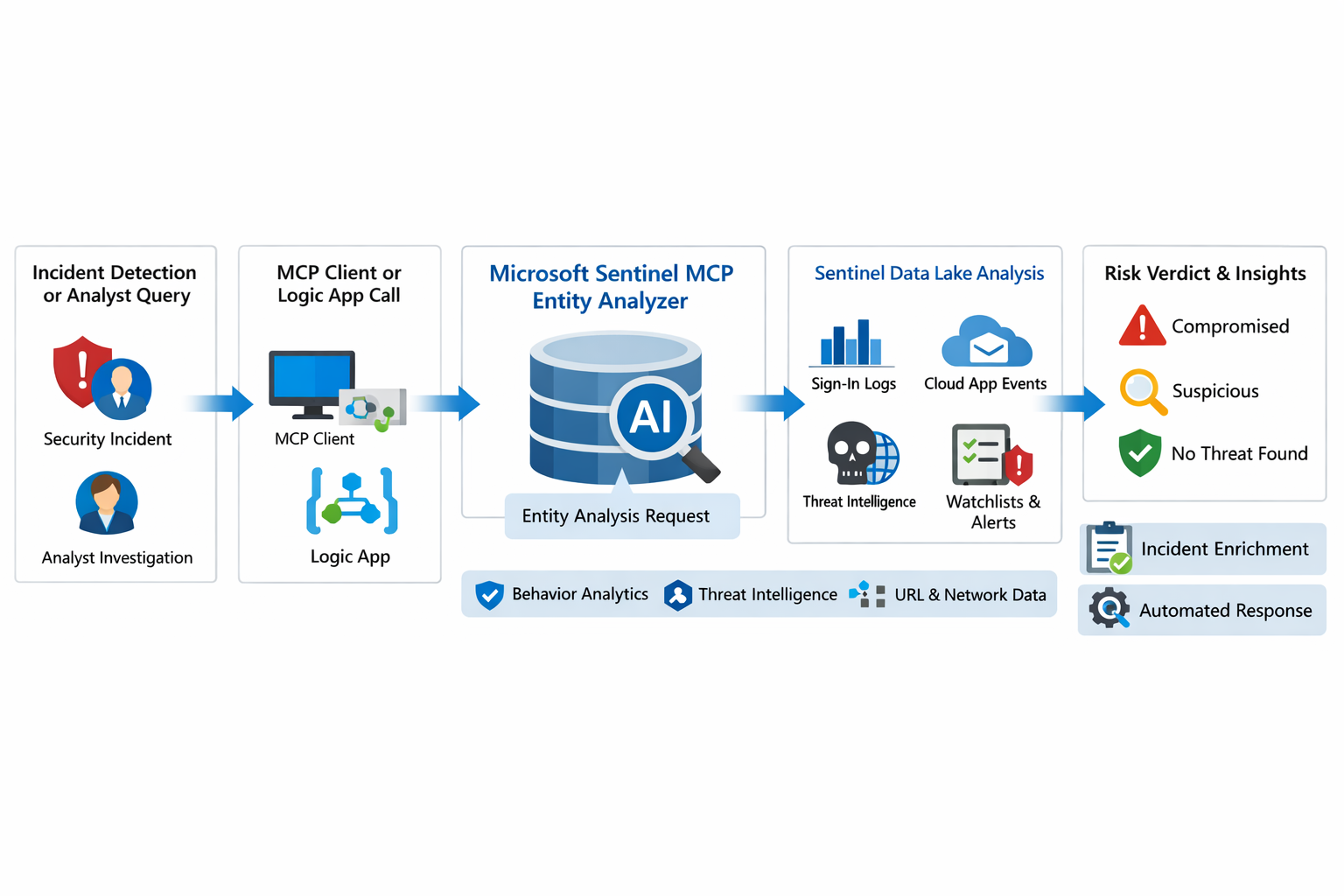
Why this matters
First, it formalizes Entity Analyzer as a production feature rather than a preview experiment. Second, it introduces a real cost model, so organizations now need to govern usage instead of treating it as a free enrichment helper. Third, the documentation is now detailed enough to support repeatable implementation patterns — prerequisites, limits, required tables, Logic Apps deployment, and cost behavior.
From a SOC engineering perspective, Entity Analyzer is interesting because it focuses on explainability. Microsoft describes it as generating clear, explainable verdicts for URLs and user identities by analyzing multiple modalities — threat intelligence, prevalence, and organizational context. That’s a much stronger operational model than simple point-enrichment, because it aims to return an assessment analysts can act on, not just more raw evidence.
What Entity Analyzer actually does
The Entity Analyzer tools analyze data in the Microsoft Sentinel data lake and provide a verdict plus detailed insights on URLs, domains, and user entities, eliminating much of the manual data collection and complex integration usually required for investigation and enrichment.
For user entities, the analyzer retrieves sign-in logs, security alerts, behavior analytics, cloud app events, identity information, and Microsoft Threat Intelligence, then correlates those signals and applies AI reasoning to produce a verdict. Example verdicts include Compromised, Suspicious activity found, and No evidence of compromise — and Microsoft warns that AI-generated content may be incorrect and should be checked for accuracy.
That warning matters. The right way to think about Entity Analyzer is not “automatic truth” but “high-value, explainable triage acceleration.” It should reduce analyst effort and improve consistency while still fitting into human review and response policy.
Under the hood: the implementation model
Entity Analyzer is delivered through the Microsoft Sentinel MCP data exploration tool collection. Entity analysis is asynchronous: you start analysis, receive an identifier, then poll for results. Analysis may take a few minutes, and the retrieval step may need to run more than once if the internal timeout isn’t enough for long operations.
Two immediate implications: this is not a lightweight synchronous enrichment call to drop carelessly into every automation branch; and any production workflow should include retry logic, timeouts, and concurrency controls. Ignore that and you’ll create fragile playbooks and unnecessary SCU burn.
The supported access path requires the Sentinel data lake and one of the supported MCP-capable platforms. Access is supported for identities with at least Security Administrator, Security Operator, or Security Reader. The collection is hosted at the Sentinel MCP endpoint, with additional Entity Analyzer roles related to Security Copilot usage.
The prerequisite many teams will miss
The most important prerequisite is easy to overlook: Microsoft Sentinel data lake is required. This is more than a licensing footnote — it directly affects data quality, analyzer usefulness, and rollout success. If the right tables aren’t onboarded into the data lake, Entity Analyzer will either fail or return reduced-confidence output.
- For user analysis, these tables are required for accuracy:
AlertEvidence,SigninLogs,CloudAppEvents, andIdentityInfo(note thatIdentityInfodepends on Defender for Identity, Defender for Cloud Apps, or Defender for Endpoint P2). It works best withAADNonInteractiveUserSignInLogsandBehaviorAnalyticstoo. - For URL analysis, it works best with
EmailUrlInfo,UrlClickEvents,ThreatIntelIndicators,Watchlist, andDeviceNetworkEvents. If those are missing, the analyzer returns a disclaimer identifying the missing sources.
A practical architecture view
- An incident, hunting workflow, or analyst identifies a high-interest URL or user.
- A Sentinel MCP client or Logic App calls Entity Analyzer.
- Entity Analyzer queries relevant Sentinel data lake sources and correlates the findings.
- AI reasoning produces a verdict, evidence narrative, and recommendations.
- The result is returned to the analyst, incident record, or automation workflow for the next step.
This collapses a multi-query, multi-tool investigation pattern into a single explainable decisioning step.
Where it fits in real operations
Entity Analyzer isn’t a replacement for analytics rules, UEBA, or threat intelligence — it’s a force multiplier for them. For identity triage it fits naturally after incidents triggered by sign-in anomaly detections, UEBA signals, or Defender alerts (it already consumes sign-in logs, cloud app events, and behavior analytics). For URL triage it complements phishing and click-investigation workflows via TI, URL activity, watchlists, and device/network context.
Implementation path 1: MCP clients and security agents
Entity Analyzer integrates with agents through Sentinel MCP server connections to first-party and third-party AI runtime platforms — attractive for analyst copilots, engineering-side investigation agents, and guided triage. The benefit is speed: an analyst can invoke it directly from an MCP-capable client without building a custom orchestration layer. The tradeoff is governance — once the tool is widely accessible, you need a clear policy for who can run it, when, and how results are validated before action.
Implementation path 2: Logic Apps and SOAR playbooks
For most SOC teams, Logic Apps is the most immediately useful model. There’s an entity analyzer action inside the Microsoft Sentinel MCP tools connector, with parameters: Workspace ID, Look Back Days, and a Properties payload for either URL or User.
URL payload:
{
  "entityType": "Url",
  "url": "[URL]"
}
User payload:
{
  "entityType": "User",
  "userId": "[Microsoft Entra object ID or User Principal Name]"
}
The connector supports Microsoft Entra ID, service principals, and managed identities, and the Logic App identity requires Security Reader. A high-severity incident can trigger a playbook, extract entities, invoke Entity Analyzer, and post the verdict back to the incident as a comment or decision artifact.
The concurrency lesson most people learn the hard way
To avoid timeouts and threshold issues, turn on Concurrency control in Logic Apps loops and keep parallelism low — Microsoft recommends starting with a maximum of five concurrent analyses, since running many at once increases latency.
This is a strong indicator that the correct pattern is selective analysis, not blanket analysis. Don’t analyze every entity in every incident — analyze the ones that matter:
- external URLs in phishing or delivery chains
- accounts tied to high-confidence alerts
- entities associated with high-severity or high-impact incidents
- suspicious users with multiple correlated signals
That keeps latency, quota pressure, and SCU consumption under control.
KQL still matters
Entity Analyzer doesn’t eliminate KQL — it changes where KQL adds value. Before running the analyzer, KQL scopes and selects the right entities. After it returns, KQL validates, hunts deeper, and builds custom evidence views around the verdict.
A simple sign-in baseline for a target user:
let TargetUpn = "<user@example.com>";
SigninLogs
| where TimeGenerated between (ago(7d) .. now())
| where UserPrincipalName == TargetUpn
| summarize
    Total=count(),
    Failures=countif(ResultType != "0"),
    Successes=countif(ResultType == "0"),
    DistinctIPs=dcount(IPAddress),
    Apps=make_set(AppDisplayName, 20)
  by bin(TimeGenerated, 1d)
| order by TimeGenerated desc
A lightweight URL prevalence check:
let TargetUrl = "omicron-obl.com";
UrlClickEvents
| where TimeGenerated between (ago(7d) .. now())
| search TargetUrl
| take 50
Cost, billing, and governance
There’s no extra cost for the MCP server interface itself. But for Entity Analyzer, customers are charged for the SCUs used for AI reasoning and for the KQL queries executed against the Sentinel data lake; existing Security Copilot entitlements apply. Per the April 2026 “What’s new” entry, starting April 1, 2026 customers are charged for the SCUs required when using Entity Analyzer.
Every rollout should include a governance plan: define who can invoke the analyzer, decide when playbooks may call it, monitor SCU consumption, limit unnecessary repeat runs, and preserve results in incident records so you don’t rerun the same analysis within a short period.
Service limits double as design requirements: 200 total runs per hour, 500 total runs per day, ~15 concurrent runs every five minutes, with analysis results available for one hour.
Limitations to state clearly
analyze_user_entity supports a maximum time window of seven days and only works for users with a Microsoft Entra object ID — on-premises Active Directory-only users aren’t supported. Results expire after one hour, and the tool collection currently supports English prompts only.
Recommended rollout pattern
Phase it: start with a narrow set of high-value use cases (suspicious user identities, phishing-related URLs); confirm the required tables are present in the data lake; deploy a Logic App enrichment pattern for incident-triggered analysis; add concurrency control and retry logic; persist returned verdicts into incident comments or case notes; then review SCU usage and analyst value before expanding coverage.